

The Practical Guide
SaaS Segmentation: The Models That Actually Move Revenue
The 6 segmentation models SaaS teams use to find which customers churn, which pay, and which pull. With examples and how to operationalise each one.
Plus the operational trick that makes segmentation actually work: tagging every survey response with user attributes at the moment it arrives.
Averages hide the customers who matter most
One number across all users gives you a thermometer. Segmented numbers give you a diagnosis.
Without segmentation
“Looks healthy. Carry on.”
- Cannot tell which segment is at risk.
- Cannot prioritise what to fix first.
- Cannot reach out by name.
- Top accounts churn quietly without warning.
With segmentation
Action: Enterprise CSMs reach out this week. Pro retention investigation next.
The 6 SaaS segmentation models
Most SaaS teams need three or four of these, not all six. Pick by the question you are trying to answer.
Plan tier segmentation
When to use: When pricing, packaging, or upsell decisions are on the table.
What it answers: Which plan tier has the highest churn? Which loves the product? Which pays the most but scores lowest?
Example signal
Overall NPS 35. Free-plan NPS 65 (love it, expected). Pro NPS 28 (okay). Enterprise NPS -10 (alarming). The detractors are the customers worth the most.
Role segmentation
When to use: When different users inside an account experience the product very differently.
What it answers: Do admins find the product easy? Do end-users? Are viewers stuck because they cannot do what they need to do?
Example signal
Admin CES 6.3 (smooth). End-user CES 3.9 (stuck). The product is broken for the people who actually use it, not the people who buy it.
Lifecycle segmentation
When to use: When trial conversion or churn is the question.
What it answers: Where in the customer lifecycle is friction concentrated? Trial drop-off? Month 1 churn? Renewal disengagement?
Example signal
Trial users: PMF score 22%. Activated users: 38%. 6-month users: 51%. The product hits PMF after activation, so onboarding is the biggest gap to fix.
Behavioral segmentation
When to use: When you want to find your power users or your at-risk users by what they actually do, not what they say.
What it answers: Who are the power users? Who is dormant but technically still active? Who is using a niche feature heavily?
Example signal
Power users (>10 sessions/week): NPS 71. Casual users (1 to 3/week): NPS 38. Dormant (none in 14 days): NPS 12 and churning next quarter.
Firmographic segmentation
When to use: When product fit varies by company size, industry, or region.
What it answers: Does the product work for 5-person teams and 500-person teams equally? Are EU customers as happy as US customers?
Example signal
US CSAT 4.6. EU CSAT 3.9. The EU score is dragged down by GDPR-related friction in onboarding that US users never see.
Acquisition channel segmentation
When to use: When you want to know which acquisition channel attracts the right kind of customer.
What it answers: Do paid users churn faster than organic? Do referral-driven users have higher LTV? Do sales-led accounts convert at higher CSAT?
Example signal
Paid signup CES 4.1 (struggle). Organic signup CES 6.3 (smooth). Either landing pages misrepresent the product, or the paid audience is the wrong fit.
Which segmentation model for which question
Common SaaS questions and the model that answers each one.
| Question you are asking | Primary model | Secondary model |
|---|---|---|
| Which customers are most likely to churn? | Lifecycle + Behavioral | Plan tier |
| What should we build next? | Plan tier + Role | Behavioral |
| Where is onboarding failing? | Lifecycle (new users) | Acquisition channel |
| Which customers should we expand? | Behavioral (power users) | Firmographic |
| Why is enterprise CSAT dropping? | Plan tier + Role | Firmographic (industry) |
| Which acquisition channel attracts the right fit? | Acquisition channel | Lifecycle (activation rate) |
| Where do we have PMF and where don't we? | Firmographic + Plan tier | Behavioral |
| Which features matter to which users? | Role + Behavioral | Plan tier |
The hard part
Segmentation is easy once attributes are attached
The model is the cheap part. The expensive part is making sure every survey response, every event, and every metric arrives with the user attributes already on it.
What breaks segmentation in practice
- Anonymous surveys (Google Forms, generic tools). A score with no user attached cannot be segmented by anything.
- Manual spreadsheet exports. Every segment view requires a fresh export, a vlookup, and a pivot. Most teams stop doing it after the first month.
- Mismatched user identifiers. Survey responses tagged by email, product events tagged by user ID. Joining them later is painful.
- Inconsistent attribute names. “plan” in one system, “tier” in another, “subscription_type” in a third. Cross-tool segmentation collapses.
What makes segmentation operational
- Identity on every response. When a user submits an NPS, the response arrives with their user ID, plan, role, region, and any custom attribute already attached.
- One-click filtering. Filter NPS by plan tier without an export. Compare CES across acquisition channels in the same dashboard.
- Pass attributes once. When you initialise the survey widget, pass all user attributes. They flow through to every response automatically.
- Geo built in. Country and region are inferred from IP. No need to ask in the survey.
Different paths for different segments
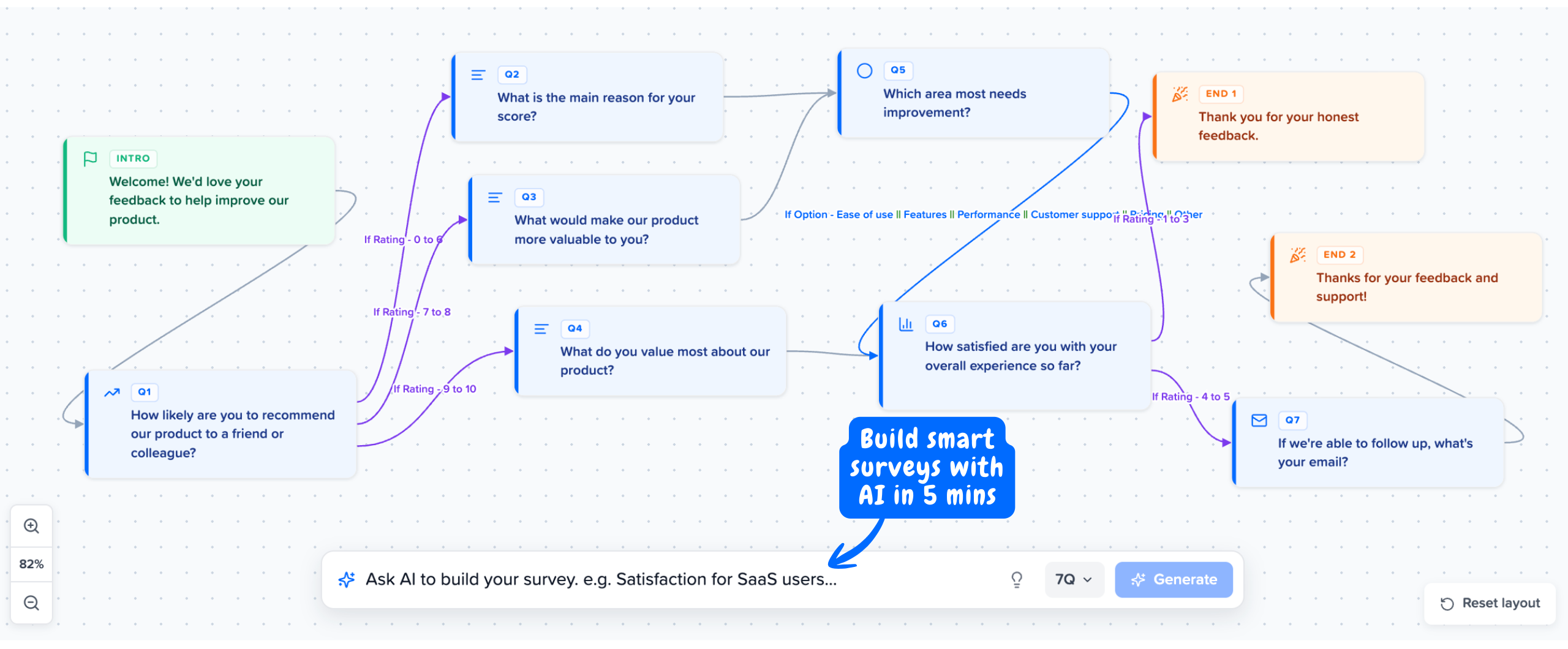
Mapster builds NPS, CSAT, CES, and PMF surveys with branching logic in 2 minutes. Free-plan users see different follow-ups than Enterprise users. Detractors take a different path than promoters. Built from a prompt by AI, fully editable.
No credit card required
Common SaaS segmentation mistakes
Five missteps that quietly invalidate the analysis.
Reporting one overall score and stopping there
An overall NPS, CSAT, or churn rate is a thermometer at best. It tells you nothing about which segment is the problem. If your dashboard shows one number, you are flying blind on the segment that matters most.
Segmenting on attributes you do not actually have
Plans, roles, signup dates, and regions only segment if they are attached to the response. Anonymous tools strip this away. Segmentation works only if identity is passed at the point of survey, not retroactively joined from a spreadsheet.
Over-segmenting on tiny samples
Splitting 100 responses across 6 segments gives you 16 responses per segment. That is statistical noise. Aim for at least 30 responses per segment before drawing conclusions, and pool segments when the sample is too small.
Treating all segments as equal weight
20 Enterprise customers paying $50k each matter more than 2,000 Free users. Weight segments by revenue, retention risk, or strategic importance when prioritising actions. Equal-weight averages mislead.
Building the segmentation model without operationalising it
A perfect segmentation framework that requires manual exports every Monday does not survive contact with a busy CS team. Build segmentation into the tool that collects the data, not the report that summarises it.
Every response auto-tagged with user attributes
Pass plan, role, region, and any custom attribute on init. Every NPS, CSAT, CES, and PMF response arrives ready to segment. Free plan available, Pro from $8/mo.
Try Segmented Surveys FreeNo credit card required