

Product Feedback Software
Collect Product Feedback by User Segment
Capture in-app feedback, feature requests, and satisfaction scores - NPS, CSAT, CES, and PMF surveys inside your product or on your website. Every response tied to the real user who gave it. Collect user feedback and know who said what, not just what the average says.
Track Product Feedback by User Segment, not just overall
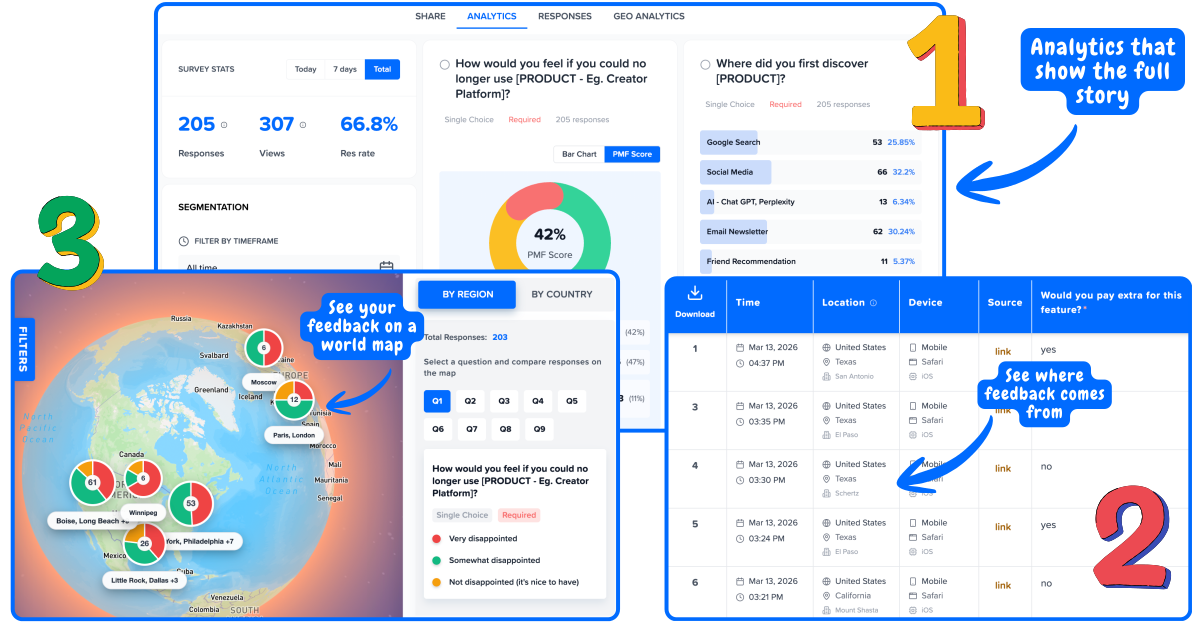
Run Surveys inside your product. Every response linked to a user and location. Spot the patterns that matter.
The 4 product feedback metrics
Each metric answers a different question about your product. Use them together for a complete picture.
Net Promoter Score
"How likely are you to recommend us to a friend or colleague?" (0–10)
Measures long-term loyalty. Segment by plan tier - an overall NPS of 42 can hide a score of 12 among your highest-revenue users.
When: Every 90 days + 30 days after onboarding + 60 days before renewal
Customer Satisfaction Score
"How satisfied were you with [experience]?" (1–5)
Measures satisfaction at a specific touchpoint. Best sent immediately after support, onboarding, or first feature use.
When: After support resolution · after onboarding · after new feature use
Customer Effort Score
"How easy was it to [complete task]?" (1–7)
Measures friction. High effort is the strongest predictor of churn - more so than dissatisfaction. Prioritize reducing friction in your top 3 workflows.
When: After setup wizard · after support ticket · after checkout or upgrade flow
Product-Market Fit
"How would you feel if you could no longer use this product?" (Very / Somewhat / Not disappointed)
40%+ "very disappointed" = strong PMF. Segment to find your champion users - the "very disappointed" group is who you build for.
When: Once you have 40+ active users · after major product changes or pivots
Survey questions to ask about a product
The right question depends on what you are trying to learn. One question per survey - each one answers a different thing.
"On a scale of 0–10, how likely are you to recommend [product] to a friend or colleague?"
"What is the main reason for your score?"
Send quarterly. The single most predictive question for long-term retention.
"How satisfied were you with [specific experience]?" (1–5)
"What could we have done better?"
Send after support, onboarding, or first feature use. Immediate context = accurate answers.
"How easy was it to [complete task] today?" (1–7)
"What made this difficult?"
Send after high-effort tasks. High effort predicts churn better than low satisfaction.
"How would you feel if you could no longer use this product?" (Very / Somewhat / Not disappointed)
"What would you use instead?"
40%+ "very disappointed" = strong PMF. Run once you have 40+ active users.
"How useful is [feature] to your workflow?" (1–5)
"What is the one thing that would make [feature] more useful to you?"
Trigger on first use or after the session where the feature was used.
Ways to collect feedback from customers
Where you collect feedback determines who you hear from and how honest they are.
In-App Surveys
Collect in-app feedback while authenticated users are actively using your product. Capture feature requests, satisfaction scores, and friction signals -triggered by specific actions like completing a workflow, reaching a scroll depth, or exit intent.
Best for
- →Feature feedback and feature requests
- →Onboarding friction detection
- →Churn exit surveys
- →NPS at 30/90 day milestones
Website Surveys
Surveys embedded on your public-facing website pages. Target anonymous visitors on your homepage, pricing page, or landing pages to understand why they do or don't convert.
Best for
- →Pricing page - why aren't you signing up?
- →Homepage - what are you looking for?
- →Exit intent - what made you leave?
- →Post-signup - what made you sign up?
Anonymous feedback is the problem,
not the solution
Most feedback tools give you scores. Mapster gives you scores linked to the user who gave them.
Generic feedback tools
NPS: 42
1,000 responses · No user context
“Looks healthy. Keep going.”
✗ No idea which plan tier is unhappy
✗ No idea which users are churn risk
✗ No idea what to fix or for whom
Mapster - user-linked feedback
Free plan · 200 users
NPS 78
"Love it - more templates please"
Pro plan · 300 users
NPS 55
"Missing integrations we need"
Enterprise · 500 users · 80% of revenue
NPS 12
"Support is too slow for what we pay"
Now you know exactly what to fix and for whom.
Mapster vs other product feedback tools
General-purpose survey tools give you anonymous rows. Mapster is purpose-built product feedback software - every response linked to a real user.
Feature
Mapster
Typeform
Hotjar
User identity linked to responses
✓
✗
✗
Segment NPS/CSAT by plan or role
✓
✗
✗
NPS, CSAT, CES, PMF templates
✓
⚠ Generic only
⚠ Limited
In-app behavioral triggers
✓
✗
✓
Geo analytics on responses
✓
✗
✗
Free plan with full features
✓
✗
✗
Why teams choose Mapster
Purpose-built for product teams who want more than anonymous scores.
In-product widget
One script tag. Surveys appear inside your app while users are actively engaged - not in emails they ignore. Response rates of 30–50% vs 5–15% for email surveys.
User-linked responses
Every response is tied to the user who gave it - their plan, role, region, and any custom attribute you pass in. No more anonymous rows you cannot act on.
Segmentation built in
Filter results by plan tier, role, signup date, or any attribute - directly in the dashboard. See which user cohorts are unhappy before they churn.
NPS, CSAT, PMF templates
Built-in templates with automatic scoring for NPS, CSAT, CES, and PMF. The 40% Sean Ellis benchmark is calculated automatically. No setup required.
Live in under 10 minutes
Add the widget snippet, pick a template, and your first survey is collecting responses the same day. No implementation project. No onboarding call.
Free plan. $19/mo Pro.
Start on the free plan with no credit card. Upgrade to Pro at $19/month - or $97/year. No annual contracts, no seat-based pricing, no sales call.
No credit card required · Free plan available
Explore by use case
Each use case has a dedicated guide with templates, benchmarks, and best practices.
Microsurveys
1–3 question surveys shown in-product at the right moment - 40–80% completion rates
Read guide →Product Feedback Questions
40+ questions organized by goal - NPS, CSAT, CES, feature feedback, churn, and open-ended discovery
Read guide →Product Feedback Surveys
Templates and questions for every stage of the product lifecycle
Read guide →Feature Prioritization
Score your roadmap on real user demand, weighted by segment, to decide what to build next
Read guide →Feature Request Surveys
Collect feature requests in-product, linked to each user and ready to prioritize
Read guide →Customer Feedback Surveys
Collect NPS, CSAT, CES, and PMF with user identity linked to every response
Read guide →Customer Satisfaction Surveys
Benchmarks, CS team workflows, and score diagnostics for NPS, CSAT, and CES
Read guide →PMF Survey
Measure product-market fit using the 40% benchmark
Read guide →Exit Survey
Capture honest feedback from users who cancel or downgrade
Read guide →Idea Validation Surveys
Validate your idea before you build with targeted user research
Read guide →Product Launch Survey
Beta feedback, first impressions, PMF check, and post-launch NPS - survey templates for every launch stage
Read guide →Feature request management, not just surveys
Most feature request software is a standalone tool disconnected from your feedback data. Mapster collects feature requests in-product and ties every request to the user who made it - so you know which requests come from your highest-value accounts.
Capture requests in-product
Users submit feature requests without leaving your app. Every request is linked to their plan tier, usage level, and account - so you never read a request without knowing who sent it and what they pay.
Prioritize by user segment
Filter feature requests by plan, cohort, or company size. A request from 12 enterprise accounts outweighs the same request from 50 free users. Feature request management software should show you that difference - not hide it.
Close the feedback loop
When you ship the feature, automatically survey the users who requested it. CSAT after delivery and NPS after adoption tell you whether you built the right thing. That loop is the difference between a feature request platform and a feature request inbox.
Frequently asked questions
What is product feedback software?+
Product feedback software lets you collect structured feedback from your users through surveys (NPS, CSAT, CES, PMF), in-app widgets, and website forms. The best tools link every response to the user who submitted it - so you can segment results by plan, role, and behavior instead of reading anonymous averages.
What types of product feedback should I collect?+
The four core types: NPS (loyalty - would users recommend you?), CSAT (satisfaction with a specific interaction), CES (effort - how easy is your product?), and PMF (would users be disappointed if you disappeared?). Run NPS quarterly, CSAT after key touchpoints, CES after support or onboarding, and PMF when you have 40+ active users.
What is the difference between in-app and website feedback?+
In-app surveys target authenticated users inside your product, triggered by specific actions. Website surveys target anonymous visitors on public pages like your pricing page. In-app feedback improves retention; website feedback improves conversion.
How do I segment product feedback by user type?+
Mapster links every response to a real user. When you install the widget, pass a user ID and any attributes you want (plan tier, role, company size). Every response is then filterable by those attributes in your dashboard. No manual tagging or CSV exports.
How is Mapster different from Typeform for product feedback, customer feedback, or user feedback?+
Typeform gives you anonymous rows in a spreadsheet - whether you're collecting product feedback, customer feedback, or user feedback. Mapster links every response to the user who submitted it: plan, role, location, and any custom attribute. You can segment NPS or CSAT by user type without exporting anything, and it includes purpose-built templates for NPS, CSAT, CES, and PMF.
Is Mapster free for product feedback?+
Yes. The free plan includes NPS, CSAT, CES, and PMF surveys, unlimited responses, user identity linking, geo analytics, and segmentation. No credit card required.
How do I get product feedback from users inside my app?+
To collect user feedback inside your product, install the Mapster widget with a single script tag and pass your user identity when they log in. You can then trigger surveys based on actions (completing a workflow, reaching a milestone, exit intent) so you get product feedback in context -not days later via email. The product feedback app captures responses alongside user attributes automatically, so every answer is already segmented by plan, role, or any custom property.
Is Mapster a product feedback app?+
Yes. Mapster is a product feedback app built specifically for SaaS teams. Unlike generic survey tools, it links every response to the authenticated user who submitted it -so you can get product feedback segmented by plan tier, role, or behavior without any manual work. It supports NPS, CSAT, CES, PMF, and custom surveys, delivered in-app or on your website.