Free online questionnaire tool
Free Online Questionnaire Maker
Branded questionnaires with real-time analytics
Create questionnaires, collect responses, and see who said what
No credit card required
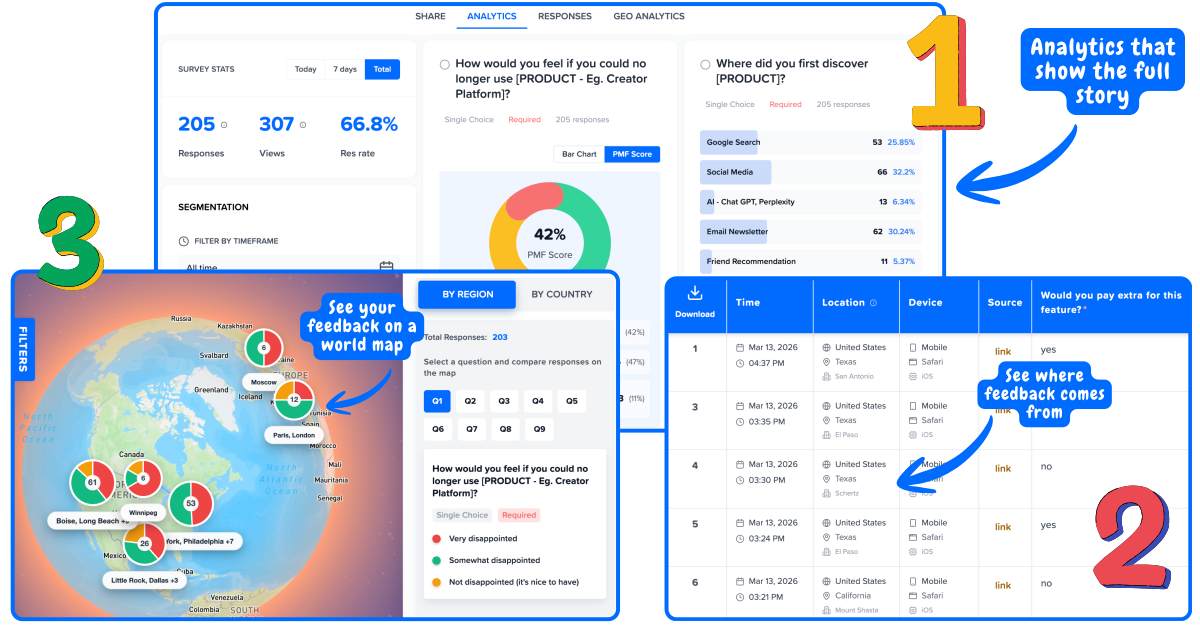
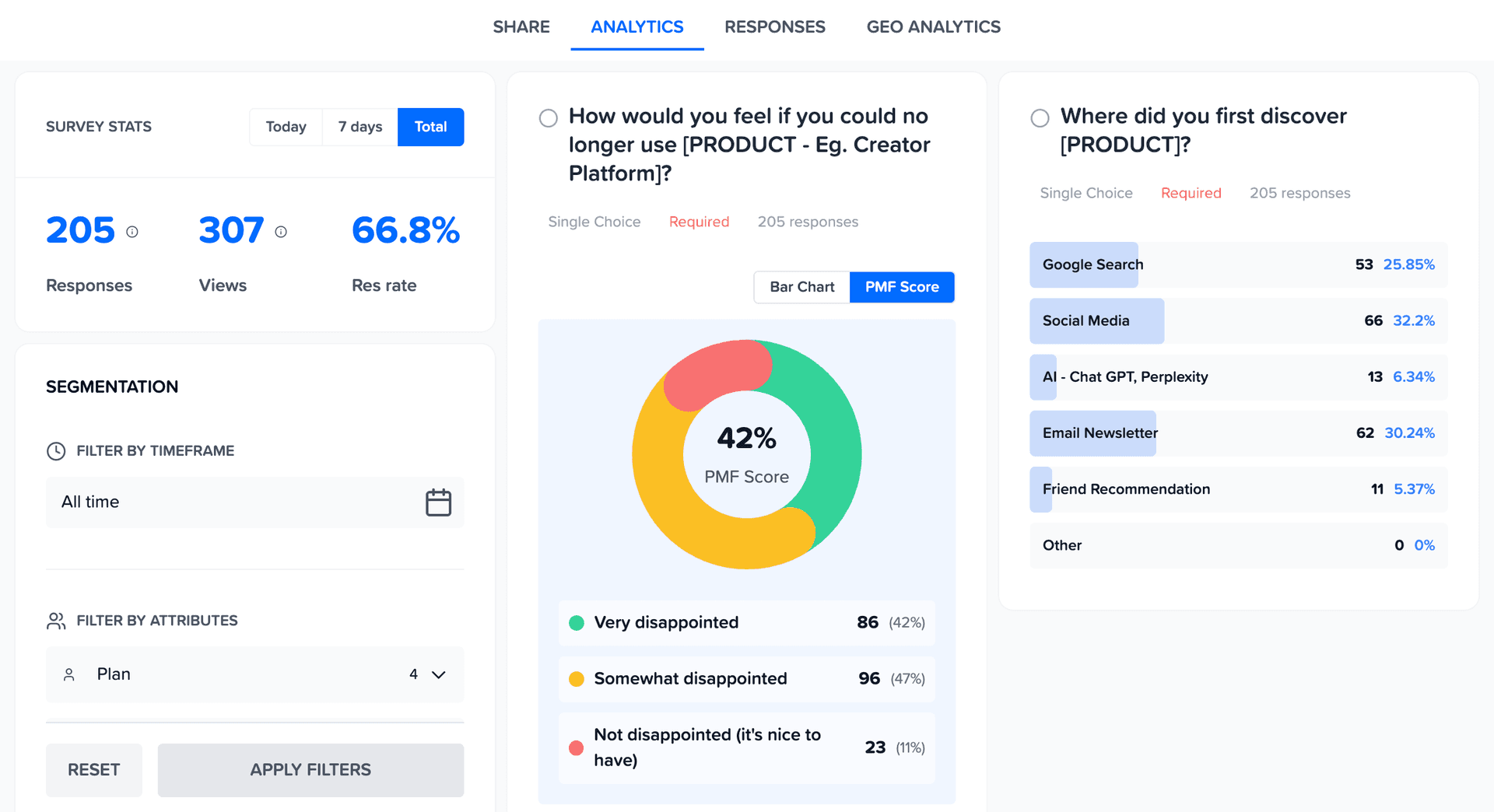
Real-time analytics for every questionnaire
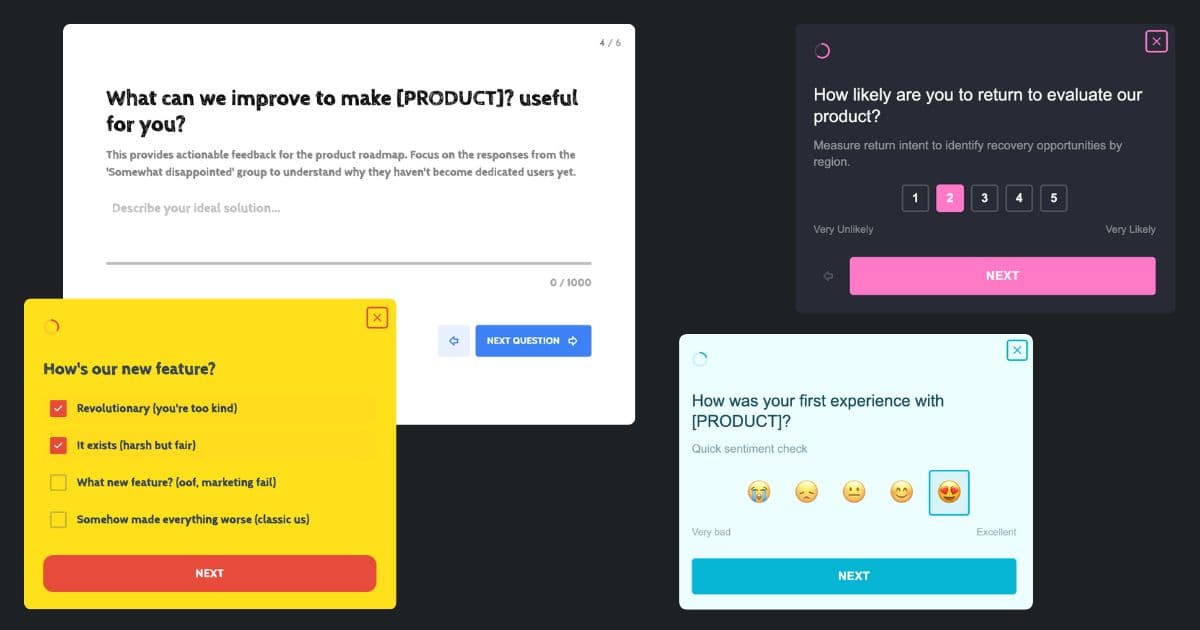
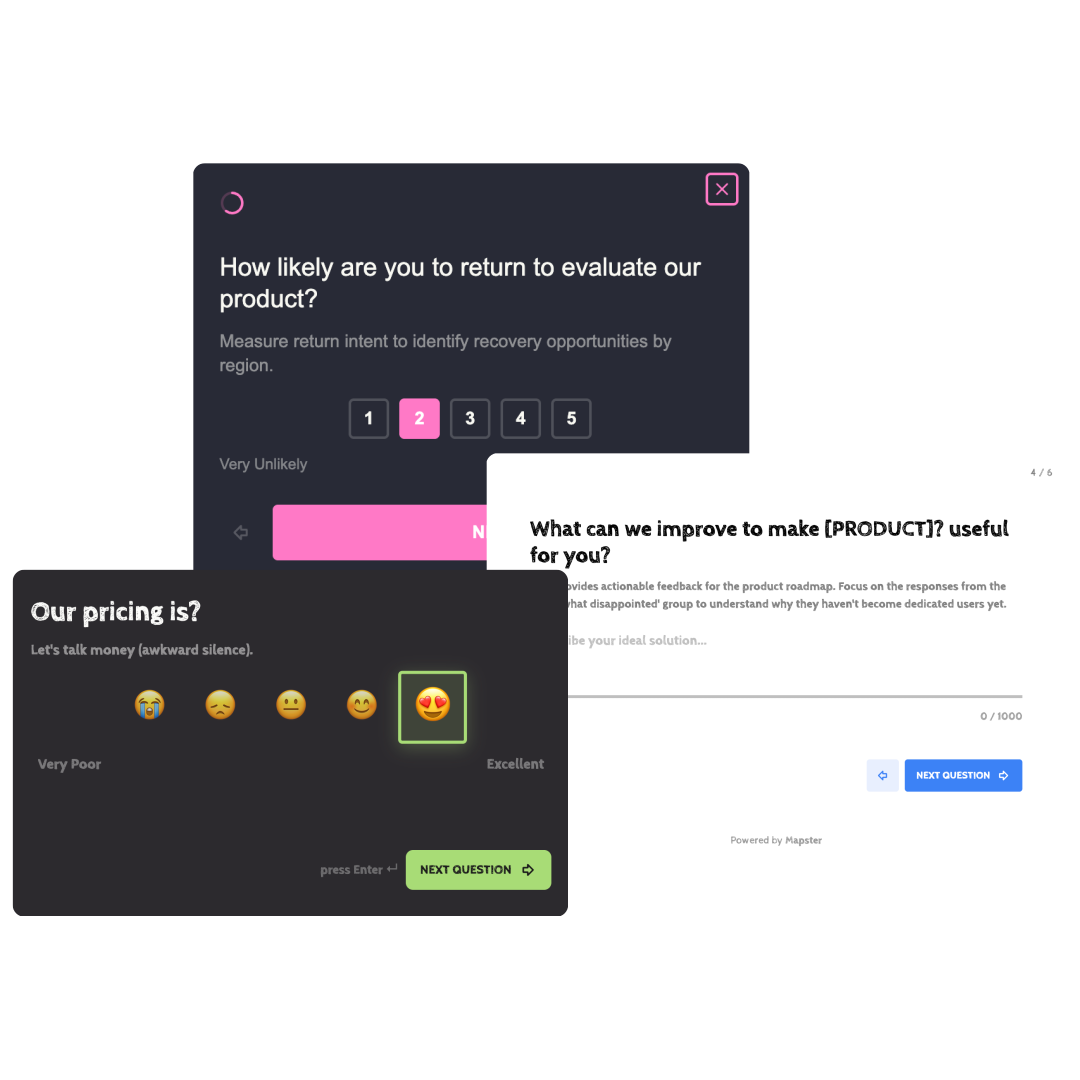
Branded questionnaires that match your product
Not your average questionnaire builder
Most questionnaire tools give you a spreadsheet of responses. Mapster connects every response to a real user so you always know who said what.
Traditional questionnaire tools
Responses dumped into a spreadsheet
No idea which users said what
One average score hides the real story
Generic forms that look off-brand
Mapster questionnaire maker
Every response linked to a real user
See who said what at a glance
Results segmented by user group
Branded questionnaires that match your product
Everything you need to create
and analyze questionnaires
Mapster is the questionnaire tool and questionnaire software that goes beyond basic questionnaire builders - a questionnaire platform that links every response to a real user. Not sure of the difference between a survey and a questionnaire? We cover that too.
Templates
Start with pre-built questionnaire templates for NPS, CSAT, product feedback, and more.
Custom Branding
Match your brand colors, logo, and style. Questionnaires that look like part of your product.
Multiple Question Types
Rating scales, multiple choice, open text, and more. Build the questionnaire you need.
Real-Time Results
Watch responses come in live. No waiting, no manual exports.
User Segmentation
See how different user groups respond. Filter by plan, role, or any attribute.
Geo Analytics
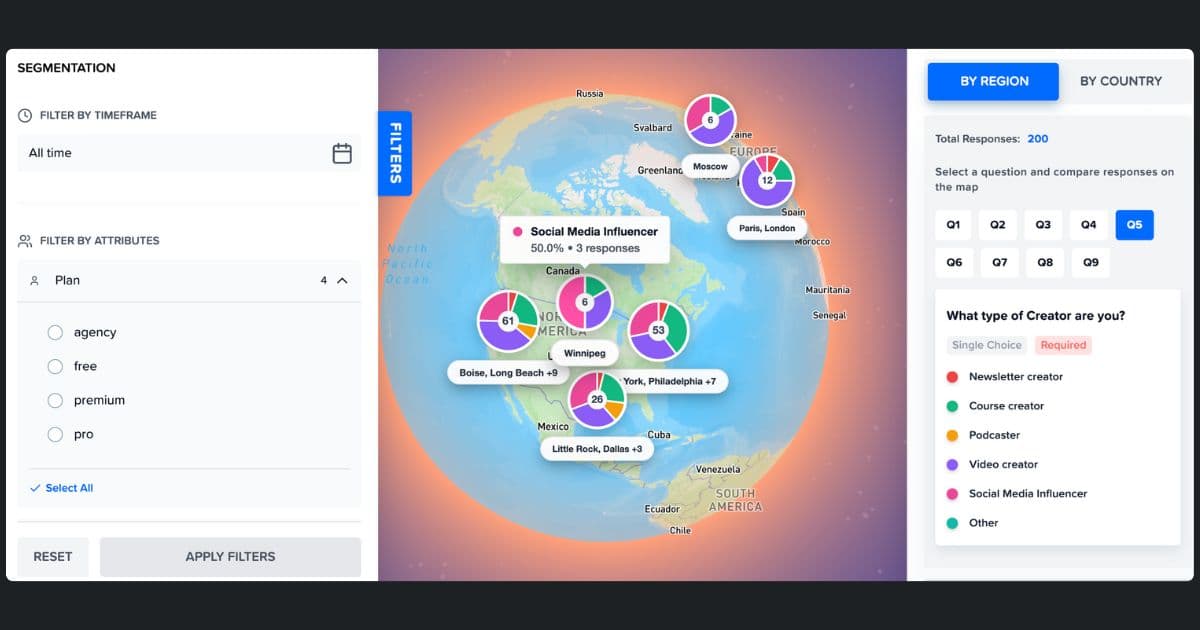
See where your responses are coming from on an interactive map.
Questionnaires for every team
Whether you need a questionnaire tool for quick research, questionnaire software for customer feedback, or a questionnaire platform for ongoing measurement - Mapster's questionnaire app adapts to your use case.
Product Teams
Run NPS, CSAT, and product-market fit questionnaires to understand what users love and what needs work. Segment results by plan or user type to prioritize the right features.
Marketing Teams
Collect post-event feedback, run brand perception questionnaires, and measure campaign effectiveness. See results in real time so you can act while the data is fresh.
Customer Success
Send satisfaction questionnaires after onboarding, support tickets, or renewals. Identify at-risk accounts before they churn with response-level user data.
Founders & Startups
Validate ideas with quick questionnaires, measure product-market fit with the Sean Ellis test, and collect early user feedback - all without paying for expensive tools.
How to create a questionnaire in 4 steps
Go from zero to a live questionnaire in under 5 minutes. No design skills needed.
Pick a template or start from scratch
Choose from pre-built questionnaire templates for NPS, CSAT, product feedback, customer satisfaction, and more - or create a blank questionnaire and add your own questions. Every template is fully customizable.
Add your questions
Use rating scales, multiple choice, open text fields, or a mix. Drag and drop to reorder. Add branching logic so respondents only see relevant questions based on their previous answers.
Brand it and share
Add your logo, match your brand colors, and customize the look. Then share via survey link, email, popup survey, or embed a feedback button inside your product.
Analyze responses in real time
Watch responses come in live on your dashboard. See aggregated results, filter by user segment, and view individual responses tied to real users - no spreadsheet exports needed.
Start with a questionnaire template
Don't start from scratch. Pick a template, customize it, and launch in minutes.
NPS Questionnaire
Measure how likely users are to recommend your product with the standard Net Promoter Score question.
Customer Satisfaction
Gauge customer satisfaction after support interactions, onboarding, or feature releases.
Product Feedback
Collect structured feedback on features, usability, and overall product experience.
Product-Market Fit
Run the Sean Ellis PMF test to find out how disappointed users would be without your product.
Website Feedback
Ask visitors what they think of your site, what's confusing, and what would make them come back.
Post-Event Questionnaire
Gather attendee feedback on events, webinars, or workshops to improve future sessions.
Questionnaire vs Survey - what's the difference?
The terms are often used interchangeably, but they have a meaningful distinction that affects how you design and use them.
Questionnaire
- →A structured set of questions used to collect data
- →Focuses on gathering information, not necessarily measuring satisfaction
- →Common in research, healthcare, HR, and onboarding
- →Can be self-administered without an interviewer
- →Usually has a defined set of questions with no branching
Survey
- →A broader process of collecting and analyzing data from a sample
- →Often includes statistical analysis of results across a population
- →Common in market research, product feedback, and customer satisfaction
- →May involve multiple rounds or longitudinal tracking
- →The questionnaire is the instrument - the survey is the method
In practice: Whether you call it a questionnaire or a survey, Mapster handles both. The distinction matters more for how you frame the research than for how you build the form. Use "questionnaire" when you are collecting structured data. Use "survey" when you are measuring opinion or satisfaction across a population.
Types of questionnaires you can create
Questionnaires are used across industries for different research goals. Mapster supports all of them.
Product research questionnaire
Collect structured input from users about features, usability, and product direction. Used before building to validate assumptions with real data.
Customer feedback questionnaire
Gather structured feedback after support interactions, onboarding, or product releases. Segment results by customer type to spot patterns.
Employee satisfaction questionnaire
Measure team sentiment, engagement, and satisfaction across departments. Identify where morale is strongest and where it needs attention.
User research questionnaire
Understand user goals, pain points, and workflows before designing a product or feature. Structured questions give you comparable data across respondents.
Onboarding questionnaire
Ask new users or employees the right questions at the start of a relationship - their goals, their experience level, and what success looks like for them.
Health and wellness questionnaire
Collect standardized health data, symptoms, or lifestyle information. Questionnaire format ensures consistency across all respondents.
Frequently asked questions
What is a questionnaire maker?
A questionnaire maker is an online tool that lets you create questionnaires, surveys, and forms to collect feedback from your users, customers, or audience. Mapster is a free questionnaire maker that goes further - every response is linked to a real user, so you can segment results and see exactly who said what.
How do I create a questionnaire for free?
Sign up for a free Mapster account, pick a template or start from scratch, add your questions, customize the branding, and share the link. You can create and publish questionnaires in under 5 minutes without entering a credit card.
What is the difference between a questionnaire and a survey?
A questionnaire is a set of questions used to collect information, while a survey is the broader process of collecting and analyzing that data. In practice, the terms are often used interchangeably. Mapster lets you create both - whether you call it a questionnaire, survey, or feedback form.
What question types can I use?
Mapster supports rating scales (1–5, 1–10, NPS), multiple choice, single select, open text, and more. You can mix question types within a single questionnaire to capture both quantitative scores and qualitative feedback.
Can I customize the look of my questionnaire?
Yes. You can add your logo, match your brand colors, and style your questionnaire so it looks like a natural part of your product or website - not a generic third-party form.
How do I share my questionnaire?
You can share questionnaires via a direct link, embed them on your website, or trigger them inside your product using Mapster's lightweight widget script. The widget loads asynchronously so it won't slow down your site.
Is Mapster really free?
Yes. Mapster has a free plan that lets you create questionnaires, collect responses, and view analytics. No credit card required. Paid plans add advanced features like higher response limits and priority support.
Can I see who responded to my questionnaire?
Yes - that's what makes Mapster different. Every response is linked to a real user, so you can see individual responses alongside user attributes like plan, role, or location. No more anonymous spreadsheet rows.
Trusted by over 100+ Startups worldwide
Powerful Analytics
Analytics that connect the dots for you
See trends, patterns, and priorities without digging through spreadsheets.
Geo Analytics
See Feedback on World Map
Your US customers love you. Your EU customers are frustrated. You'd never know from an average. Map feedback by region to spot geographic patterns instantly.
Analyze like a Pro
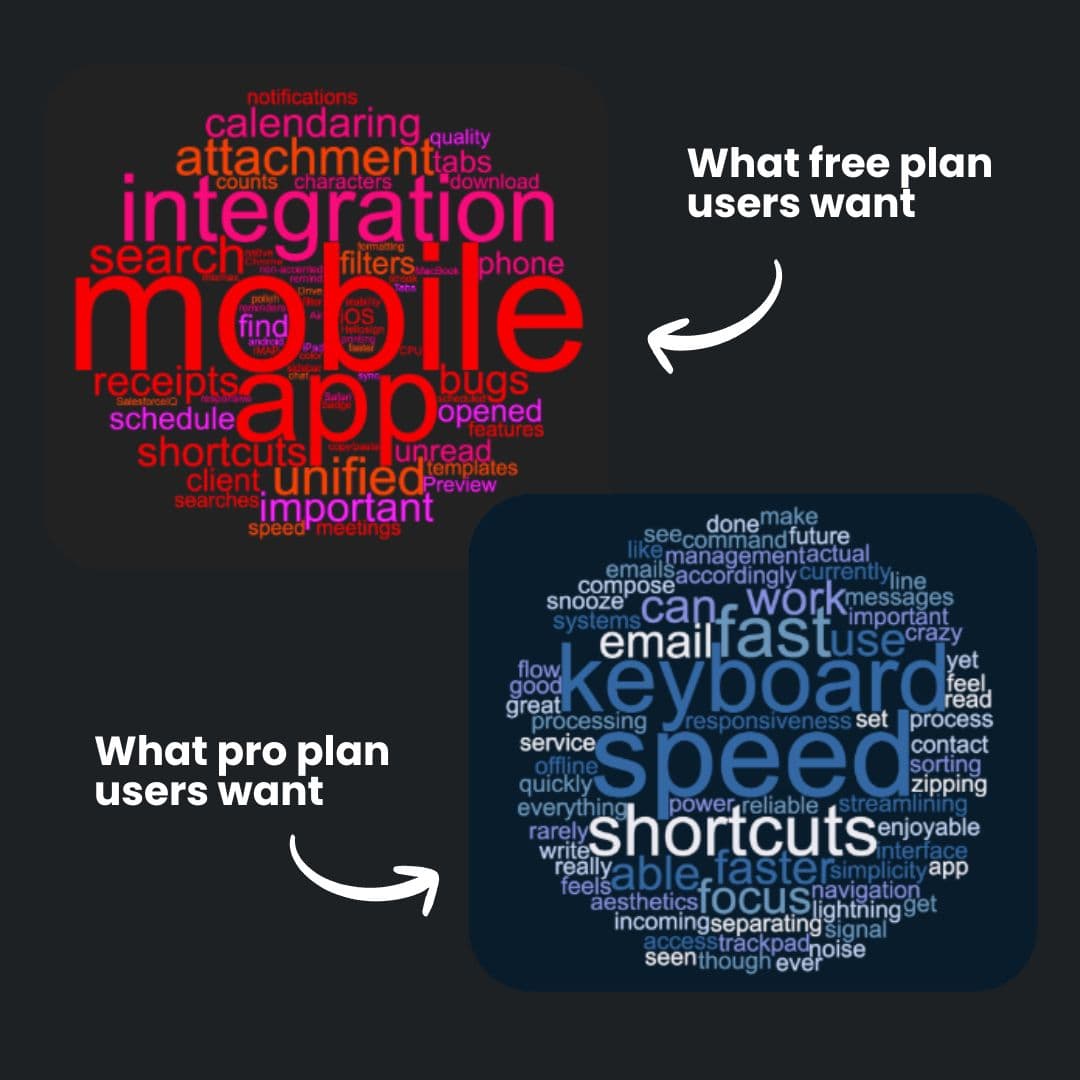
See Word Cloud from Open-Ended Feedback
See what each segment is actually saying. One word cloud per segment - so you know what matters to who.
- ✓Auto-generated from survey responses
- ✓Filter by segment to see different priorities
- ✓Spot patterns without reading every response
Build like a Pro
Surveys that look like your product
Match your surveys to your product. Custom colors, logo, and styling — so feedback collection feels native, not third-party.