Feedback Survey Software
Free Online
Survey Maker
Beautiful, branded surveys with real-time analytics
Real-time Analytics
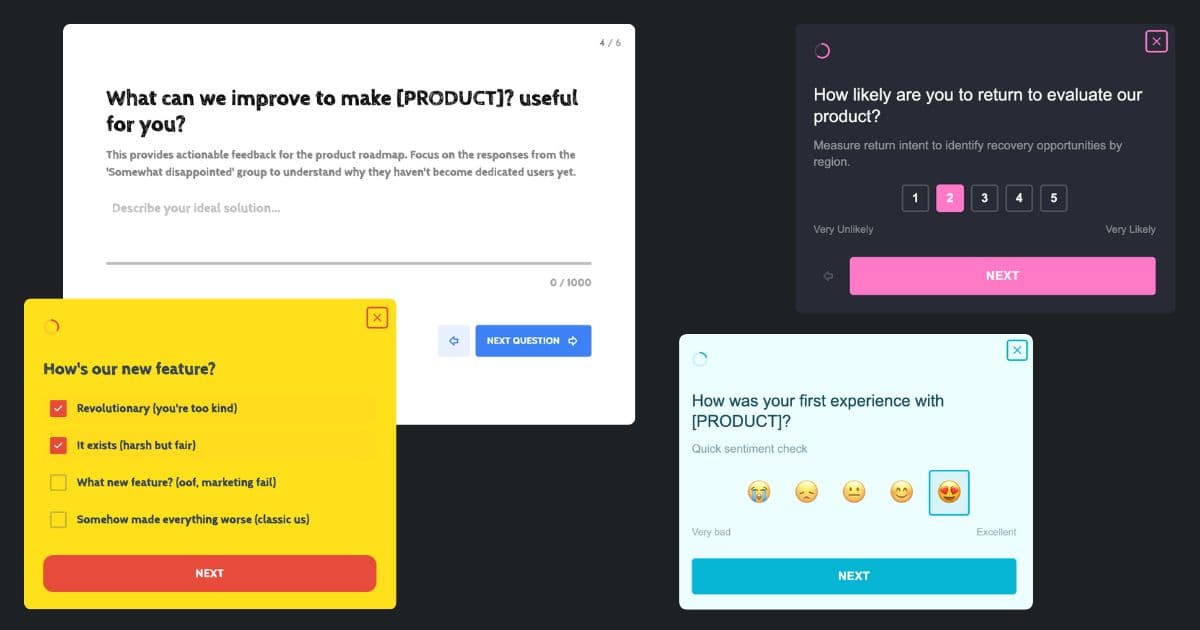
Branded Surveys that Match your Product
Not your Average Survey Maker
Most survey tools give you a spreadsheet of responses. Mapster connects every response to a real user so you always know who said what.
Traditional survey makers
Responses dumped into a spreadsheet
No idea which users said what
One average score hides the real story
Generic forms that look off-brand
Mapster survey maker
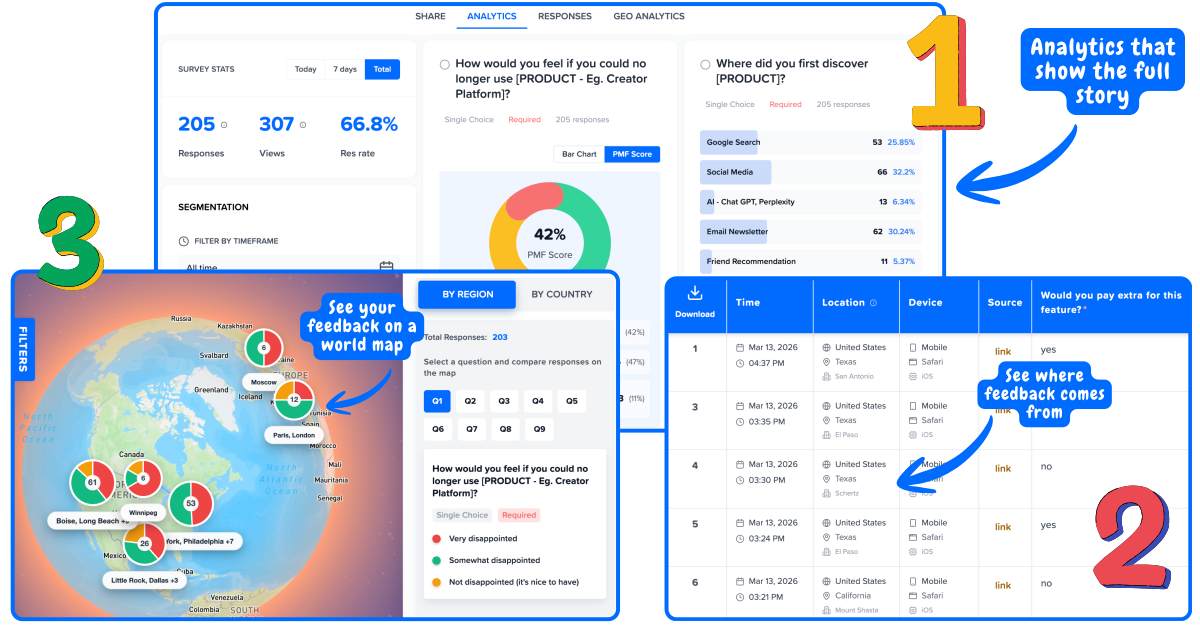
Every response linked to a real user
See who said what at a glance
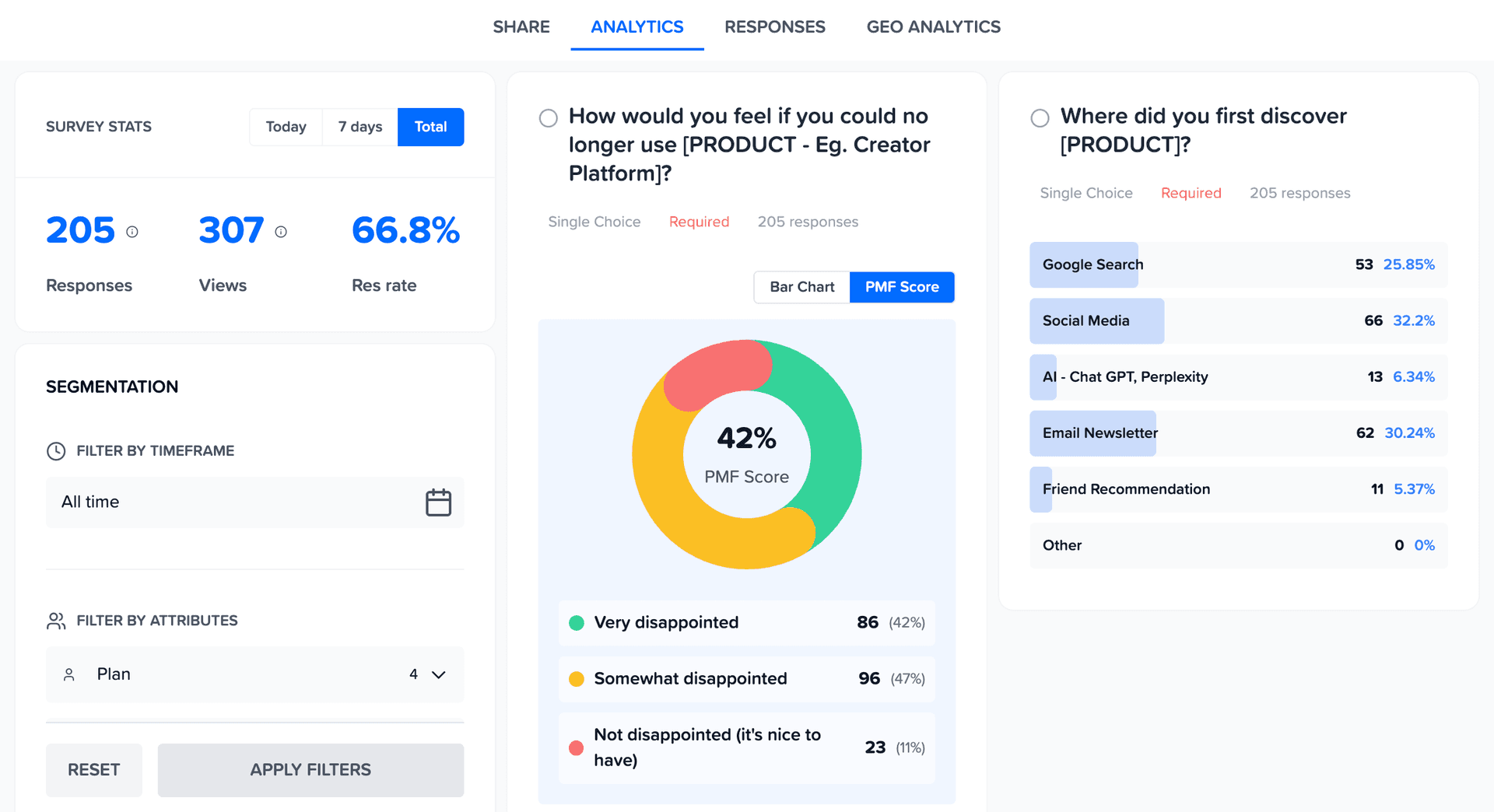
Results segmented by user group
Branded surveys that match your product
Survey Software built for every Use Case
Mapster is the survey app and survey software that goes beyond basic survey tools - a survey platform that links every response to a real user, not just another spreadsheet. Need a questionnaire instead? Mapster handles both - and if you are wondering about the difference between a survey and a questionnaire, we have that covered too.
Templates
Start with pre-built survey templates for NPS, CSAT, product feedback, and more.
Custom Branding
Match your brand colors, logo, and style. Surveys that look like part of your product.
Multiple Question Types
Rating scales, multiple choice, open text, and more. Build the survey you need.
Real-Time Results
Watch responses come in live. No waiting, no manual exports.
User Segmentation
See how different user groups respond. Filter by plan, role, or any attribute.
Geo Analytics
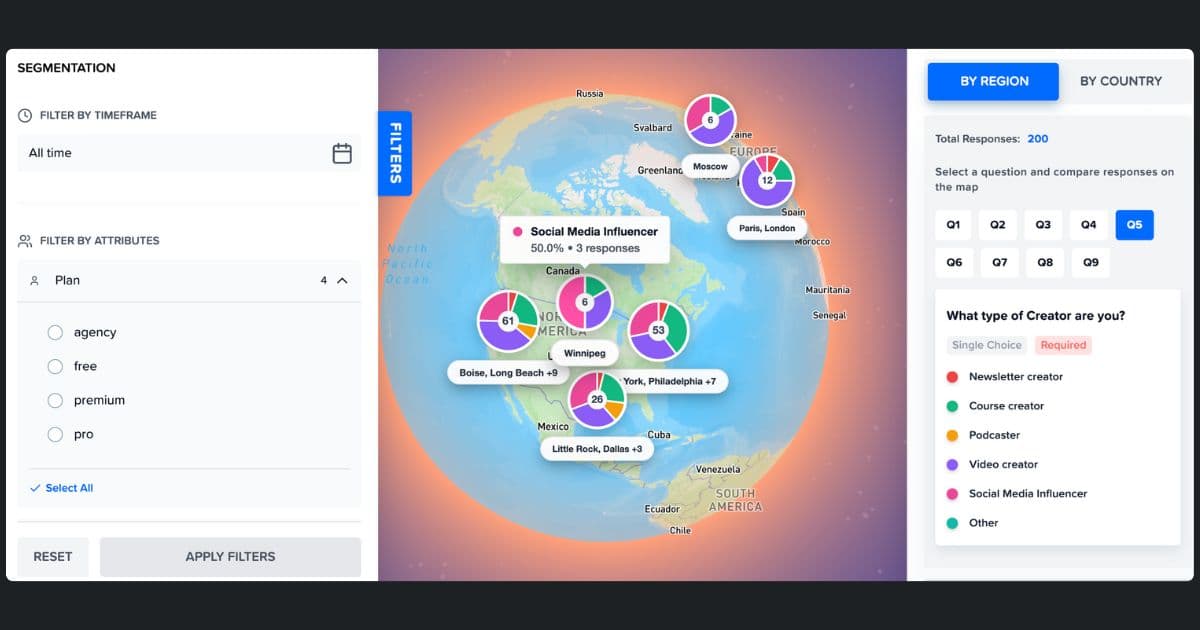
See where your responses are coming from on an interactive map.
The Survey Tool for every Team
Whether you need a survey tool for quick polls, survey software for customer feedback, or a survey platform for ongoing product measurement - Mapster adapts to your use case.
Product Teams
Run NPS, CSAT, and product-market fit surveys to understand what users love and what needs work. Segment results by plan or user type to prioritize the right features.
Marketing Teams
Collect post-event feedback, run brand perception surveys, and measure campaign effectiveness. See results in real time so you can act while the data is fresh.
Customer Success
Send satisfaction surveys after onboarding, support tickets, or renewals. Identify at-risk accounts before they churn with response-level user data.
Founders & Startups
Validate ideas with quick surveys, measure product-market fit with the Sean Ellis test, and collect early user feedback - all without paying for expensive survey tools.
How to create a survey in 4 steps
Go from zero to a live survey in under 5 minutes. No design skills needed.
Choose the right survey type for your goal
Pick NPS to measure loyalty, CSAT to score support or onboarding, PMF to test product-market fit, or start from a blank survey. Pre-built templates are ready to launch in minutes - every one fully customizable.
Write questions that get honest answers
Add rating scales, multiple choice, open text, or NPS (0–10). Mix types freely in a single survey. Add branching logic so respondents only see questions that are relevant to their previous answer.
Match your brand and choose how to share
Upload your logo, pick your brand colors, and preview the result instantly. Then share via survey link, email, popup, or embed a feedback button inside your product.
See who said what - not just what was said
Responses appear in your dashboard in real time, each linked to the user who submitted it. Filter by plan, role, or location to see how different user groups answer - and know exactly who to follow up with.
Start with a Survey Template
Don't start from scratch. Pick a template, customize it, and launch in minutes.
NPS Survey
Measure how likely users are to recommend your product with the standard Net Promoter Score question.
CSAT Survey
Gauge customer satisfaction after support interactions, onboarding, or feature releases.
Product Feedback
Collect structured feedback on features, usability, and overall product experience.
Product-Market Fit
Run the Sean Ellis PMF test to find out how disappointed users would be without your product.
Website Feedback
Ask visitors what they think of your site, what's confusing, and what would make them come back.
Post-Event Survey
Gather attendee feedback on events, webinars, or workshops to improve future sessions.
Frequently asked questions
What is a survey maker?
A survey maker (also called a survey creator, survey tool, or survey software) is an online tool that lets you create surveys, questionnaires, and forms to collect feedback from your users, customers, or audience. Mapster is a free survey maker and survey creator that goes further - every response is linked to a real user, so you can segment results and see exactly who said what.
How do I create a survey for free?
Sign up for a free Mapster account, pick a template or start from scratch, add your questions, customize the branding, and share the link. You can create and publish surveys in under 5 minutes without entering a credit card.
What question types can I use?
Mapster supports rating scales (1–5, 1–10, NPS), multiple choice, single select, open text, and more. You can mix question types within a single survey to capture both quantitative scores and qualitative feedback.
Can I customize the look of my survey?
Yes. You can add your logo, match your brand colors, and style your survey so it looks like a natural part of your product or website - not a generic third-party form.
How do I share my survey?
You can share surveys via a direct link, embed them on your website, or trigger them inside your product using Mapster's lightweight widget script. The widget loads asynchronously so it won't slow down your site.
Is Mapster really free?
Yes. Mapster has a free plan that lets you create surveys, collect responses, and view analytics. No credit card required. Paid plans add advanced features like higher response limits and priority support.
Can I see who responded to my survey?
Yes - that's what makes Mapster different. Every response is linked to a real user, so you can see individual responses alongside user attributes like plan, role, or location. No more anonymous spreadsheet rows.
What types of surveys can I create?
You can create NPS surveys, CSAT surveys, product-market fit surveys, customer feedback forms, website feedback surveys, post-event questionnaires, and any custom survey you need. Mapster provides templates for the most common use cases.
How does Mapster compare to Google Forms as a survey maker?
Google Forms is free but gives you anonymous responses in a spreadsheet with no branding control. Mapster links every response to a real user, supports custom branding on the free plan, and shows results in a real-time analytics dashboard - not a spreadsheet. If you need to know who said what, Mapster is a significantly better Google Forms alternative for product teams and SaaS companies.
How does Mapster compare to SurveyMonkey and Typeform?
SurveyMonkey's free tier limits you to 10 questions and 40 responses per survey and locks results behind a paywall. Typeform charges $25–99/month for custom branding and logic jumps. Mapster offers custom branding, user identity linking, and real-time analytics on its free plan - no arbitrary question limits, no response walls, no forced upgrades.
Powerful Analytics
Analytics that connect the dots for you
See trends, patterns, and priorities without digging through spreadsheets.
Geo Analytics
See Feedback on World Map
Your US customers love you. Your EU customers are frustrated. You'd never know from an average. Map feedback by region to spot geographic patterns instantly.
Analyze like a Pro
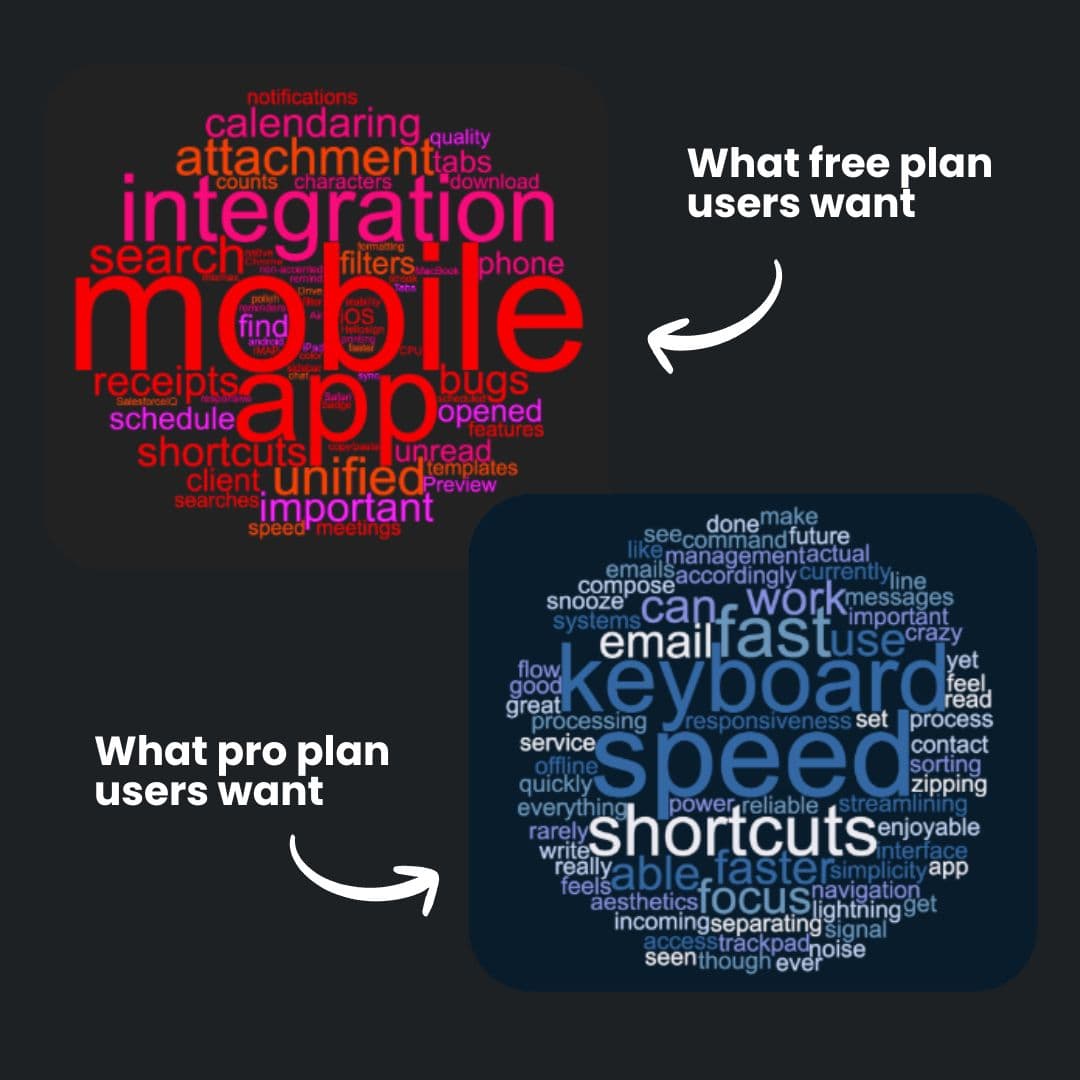
See Word Cloud from Open-Ended Feedback
See what each segment is actually saying. One word cloud per segment - so you know what matters to who.
- ✓Auto-generated from survey responses
- ✓Filter by segment to see different priorities
- ✓Spot patterns without reading every response
Build like a Pro
Surveys that look like your product
Match your surveys to your product. Custom colors, logo, and styling — so feedback collection feels native, not third-party.