

TL;DR
SurveyMonkey is a general-purpose research platform built for market research, HR surveys, and enterprise studies. It has 25+ question types, advanced logic, and 100+ integrations - and starts at $99/month per user with a 3-user minimum. Mapster is purpose-built for SaaS product feedback. Every response links to a real user, results segment by plan or role, and NPS/CSAT/PMF scoring is automatic - at $19/month flat for your entire team. Choose SurveyMonkey for enterprise research projects. Choose Mapster for SaaS customer feedback that shows you which users said what.
Track Feedback by user segment,
not just overall
Run surveys inside your product. Every response linked to a real user and location. Spot the patterns that matter.
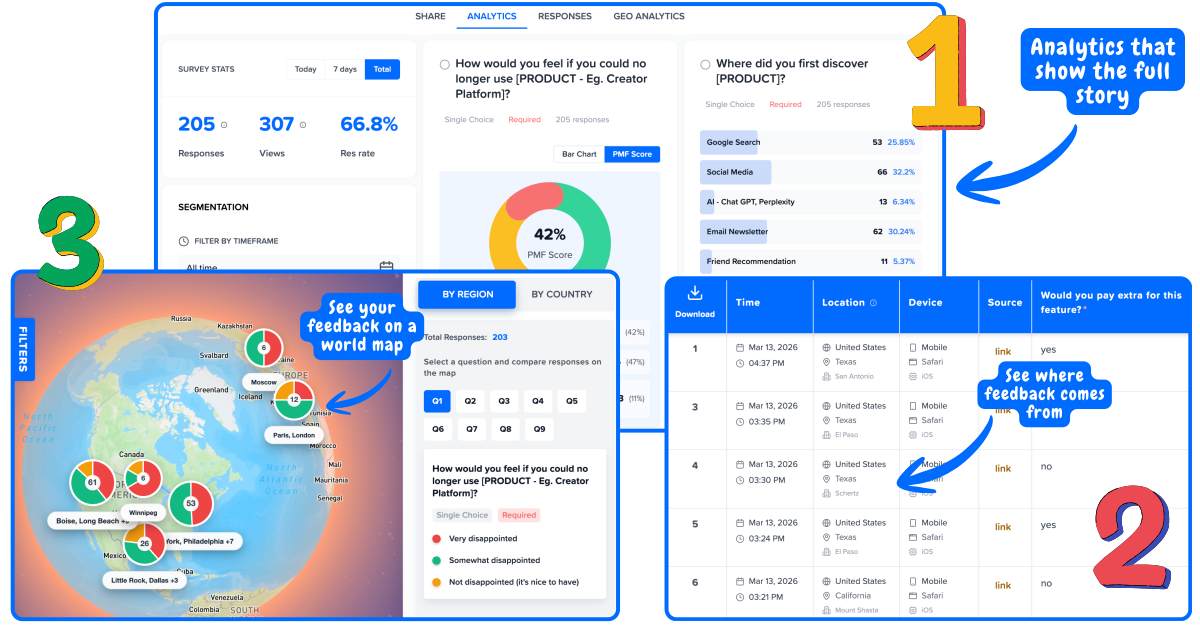
Every response linked to a real user
Pass user attributes on init and every response comes back with the user's plan, role, signup date, and any custom attribute you track.
Segment results instantly
Filter NPS by plan tier. Filter PMF by company size. Filter churn surveys by last active date. No data export, no pivot table.
Flat pricing - no per-seat fees
Your PM, CS lead, and CEO all see the same dashboard for $19/mo total. SurveyMonkey's 3-user minimum is $297/mo before anyone creates a survey.
Collect Feedback with Context
Other tools
"100 users are happy, 40 are unhappy."
Mapster Surveys
100 happy users · pro plan users · from USA · "love onboarding"
40 unhappy users · free plan users · from EU · "frustrated by pricing"
Side-by-side comparison
| Feature | Mapster | SurveyMonkey |
|---|---|---|
| Starting price | $19/mo flat (Pro) | $99/mo per user (Team Advantage) |
| Per-seat pricing | No - flat rate for whole team | Yes - 3 user minimum ($297/mo) |
| Free plan | Yes - no credit card, no response cap | Yes - capped at 25 responses per survey |
| User-level responses | Every response linked to a real user | Anonymous by default |
| Segmentation | By plan, role, region, custom attributes | Cross-tabulation on premium plans |
| NPS scoring | Automatic calculation and trends | Available on paid plans |
| CSAT / CES scoring | Built-in templates and auto-scoring | Available on paid plans |
| PMF survey | Sean Ellis template with 40% benchmark | Build from scratch, no benchmark |
| In-app survey widget | Lightweight JS snippet, one script tag | Website embed / pop-up (not in-app) |
| Survey logic | Conditional logic | Advanced branching, skip logic, piping |
| Question types | Rating, NPS, multiple choice, open text | 25+ types including matrix, ranking |
| Response limits | Unlimited on all plans | 25 per survey (free), varies by plan |
| Data export | CSV, dashboard | CSV, XLS, PDF, SPSS |
| Integrations | Slack, Zapier, webhook | 100+ (Salesforce, HubSpot, Slack, etc.) |
| Built for | SaaS product feedback teams | Market research, HR, enterprise surveys |
Where the real differences are
SurveyMonkey has been around since 1999 and is built for research at scale. The question is whether you need that - or just reliable SaaS product feedback.
1. Research platform vs. SaaS feedback tool
SurveyMonkey is a full-scale research platform with 25+ question types, advanced branching logic, survey panels, SPSS exports, and compliance features for regulated industries. It is the right tool for running a 10,000-respondent market research study or an annual employee engagement survey.
Mapster does not try to be a research platform. It is built for one thing: collecting feedback from your SaaS users and showing you which segments said what. If you need SPSS exports and matrix questions, SurveyMonkey wins. If you need to know that your Enterprise users score NPS 68 while your Starter users score 14, Mapster is the faster, cheaper path.
2. Per-seat pricing adds up fast
SurveyMonkey's Team Advantage plan is $99/month per user with a 3-user minimum - $297/month before anyone creates a survey. Their Premier plan is $149/month per user. If your PM, CS lead, and marketing lead all need access, you are looking at $450–600/month easily.
Mapster Pro is $19/month flat - or $97/year. Your entire team accesses the same dashboard with no per-seat fees. Annual savings versus a 3-person SurveyMonkey team: over $3,400/year.
3. Anonymous surveys vs. user-linked feedback
SurveyMonkey is designed for anonymous research - a feature, not a bug, for market research and HR surveys. But for SaaS product feedback, anonymity is a problem. When someone says your product is "too complicated," you need to know whether that is a power user or a day-one signup.
Mapster links every response to a real user. You see their plan, role, signup date, and any custom attributes alongside their feedback. When CSAT drops, you do not just know it dropped - you know it dropped among your highest-paying customers, and you can act immediately.
4. Segmentation without spreadsheet gymnastics
SurveyMonkey offers cross-tabulation and filtering on paid plans - filtering by answers within the survey itself, not by who the user is in your product. To get plan-level NPS, you need to add a "What plan are you on?" question to every survey, then cross-tab manually.
Mapster segments by user attributes from your product: plan tier, role, company size, region, tenure, or any custom field. The context follows the user automatically, and you can compare segments with one click - no extra questions, no pivot tables.
5. In-app surveys vs. link-based distribution
SurveyMonkey primarily distributes surveys via links, email, and their panel marketplace. Their website collector and pop-up are not designed for contextual in-product surveys triggered by user behavior inside your app.
Mapster includes a lightweight JavaScript widget that lives inside your product. Trigger surveys after onboarding, on specific feature usage, or on exit intent. In-app surveys get 3–5x higher response rates than email because you reach users in context.
6. Where SurveyMonkey is the better choice
SurveyMonkey is genuinely better for large-scale research. If you need to survey thousands of people from a panel, run conjoint analysis, export to SPSS, or meet compliance requirements for healthcare or finance, SurveyMonkey has the depth to do it.
It is also the better choice for HR teams running employee engagement surveys and academic researchers who need 25+ question types and complex survey designs. If your needs go beyond SaaS customer feedback, SurveyMonkey covers more ground.
Which one is right for you?
Choose SurveyMonkey if you need
Large-scale market research (1,000+ respondents)
Advanced survey logic (piping, randomization, quotas)
Panel marketplace to find respondents
SPSS, XLS, or PDF data exports
HR employee engagement surveys
Compliance features (HIPAA, SOC 2)
100+ native integrations
SurveyMonkey is the right choice for enterprise research teams running complex, large-scale surveys.
Choose Mapster if you need
Customer feedback linked to real users (not anonymous)
NPS, CSAT, CES, or PMF surveys with auto-scoring
Results segmented by plan, role, or attribute
An in-app widget for contextual product surveys
Flat pricing for your whole team - no per-seat fees
A free plan with no 25-response cap
A focused SaaS tool at $19/mo instead of $297/mo
Mapster is the right choice when you need to know which customer segments are happy and which need attention - without paying per seat.
Pricing
SurveyMonkey charges per seat. Mapster charges a flat rate. The difference adds up fast.
SurveyMonkey Team Advantage
$99/user/mo
3 user minimum = $297/mo
+ 25+ question types
+ Advanced logic and piping
+ 100+ integrations
- Per-seat pricing multiplies costs
- Anonymous responses - no user context
- No lightweight in-app widget
Mapster Pro
$19/mo
or $97/year. Flat rate - no per-seat fees.
+ Unlimited responses, no caps
+ Every response linked to a real user
+ NPS, CSAT, CES, PMF auto-scoring
+ In-app widget for contextual surveys
+ Segmentation by plan, role, any attribute
+ Free plan - no credit card required
3-person team: SurveyMonkey $3,564/year vs Mapster $97/year.
Real scenarios, real differences
Your PM, CS lead, and CEO all need to see survey results
With SurveyMonkey
Each person needs their own SurveyMonkey seat at $99/month. That is $297/month minimum. Adding one more teammate brings it to $396/month.
With Mapster
Everyone on your team accesses the same Mapster dashboard. One $19/month plan covers everyone. Add your whole company - the price does not change.
You want to measure NPS segmented by customer plan
With SurveyMonkey
Create an NPS survey, add a "What plan are you on?" question, send it out, then use cross-tabulation to break down scores. Cross-tabs require a paid plan and manual setup.
With Mapster
Pick the NPS template, embed the widget. Plan tier is passed automatically from your product. Click "Segment by Plan" and see Pro users at 71, Starter at 23. No extra questions needed.
You need to understand why churn spiked this quarter
With SurveyMonkey
Build a cancellation survey and share it as a link. Responses are anonymous rows. You see "pricing" was the top reason 40% of the time - but not whether those were $29/mo or $299/mo customers.
With Mapster
Trigger an exit survey on cancellation. See that Starter users churn over "missing features" while Enterprise users churn over "slow support." Every response links to their actual account data.
Why SaaS teams switch from SurveyMonkey
SurveyMonkey is a great research tool. But SaaS teams keep hitting the same walls.
Per-seat pricing makes team access expensive
When three people on your team need to view results, you are at $297/month before a single survey runs. SurveyMonkey was designed for enterprise research budgets, not early-stage SaaS teams who want everyone in the same dashboard.
Every response is anonymous - you can't act on it
SurveyMonkey does not know who your users are in your product. Responses arrive as rows with no context. An NPS score of 23 tells you nothing unless you know whether it came from your $99/mo or your $999/mo customers.
No real in-app widget for contextual surveys
SurveyMonkey distributes surveys via links and email. Their website pop-up is not designed for triggering contextual surveys based on user behavior inside your app. Response rates suffer because users see the survey hours after the experience that prompted it.
Built for market research, not SaaS product feedback
SurveyMonkey's strengths - 25+ question types, SPSS exports, panel marketplace - are designed for research teams, not product teams. PMF surveys, segmented NPS, and exit surveys are afterthoughts, not the core use case.
The free tier caps out at 25 responses per survey
SurveyMonkey's free plan limits you to 25 responses per survey. For a product with even 200 active users, that cap is hit in hours and you're left with incomplete data. Mapster's free plan collects unlimited responses.
How to switch from SurveyMonkey to Mapster
Most teams are live with their first Mapster survey the same day they sign up.
Create your free Mapster account
Sign up at mapster.io - no credit card required. Your free plan includes the widget, NPS/CSAT/PMF templates, and full user segmentation.
Install the Mapster widget
Add one script tag to your app and call mapster.init() with your user's ID, plan, and any attributes. Takes under 10 minutes.
Choose your survey templates
Pick NPS, CSAT, PMF, or an exit survey template. Customize the copy, set your trigger logic, and publish. Your first survey can be live the same day.
Export your SurveyMonkey history first
Download your existing responses as CSV or XLS from SurveyMonkey before switching. Keep your historical data - Mapster starts fresh from the day you install.
No trial expiry. Free plan stays free with no response caps.
Frequently asked questions
How much does SurveyMonkey cost compared to Mapster?
SurveyMonkey's Team Advantage plan starts at $99/month per user with a 3-user minimum - $297/month before anyone creates a survey. Mapster Pro is $19/month flat with no per-seat pricing. For a 3-person team, SurveyMonkey costs $3,564/year vs Mapster at $97/year.
Does SurveyMonkey have user-level segmentation?
SurveyMonkey offers cross-tabulation and filtering on paid plans - but this is survey-level segmentation, filtering by answers within the survey itself. It does not link responses to identified users in your product or automatically segment by plan tier, role, or custom attributes the way Mapster does.
Does SurveyMonkey support NPS and CSAT surveys?
Yes, SurveyMonkey has NPS and CSAT question types with scoring on paid plans. However, segmenting those scores by user attributes requires adding demographic questions to every survey and manually cross-tabulating. Mapster calculates and segments NPS, CSAT, CES, and PMF scores automatically using user context passed from your product.
Is SurveyMonkey or Mapster better for SaaS companies?
Mapster is purpose-built for SaaS product feedback - user-linked responses, in-app surveys, and PMF scoring designed for product teams. SurveyMonkey is a general-purpose research platform built for market research, HR surveys, and academic studies. For SaaS customer feedback, Mapster is more focused and significantly more affordable.
Can I switch from SurveyMonkey to Mapster?
Yes. Sign up for a free Mapster account, install the widget (one script tag), and pick your survey templates. Export your SurveyMonkey responses as CSV before switching to keep your historical data. Most teams are running their first Mapster survey the same day they sign up.
Does SurveyMonkey have an in-app survey widget?
SurveyMonkey offers a website embed and pop-up option, but not a lightweight in-app widget designed for contextual product surveys triggered by user behavior. Mapster's JavaScript widget installs with one script tag, triggers surveys inside your product based on user attributes or events, and gets 3–5x higher response rates than link-based distribution.
Track Customer Feedback by User Segment, not just overall
Segment feedback by plan, role, or any attribute. See exactly which user groups need attention.
Get Started FreeNo credit card required