

Collect · Manage · Analyze
User Feedback Software
User feedback software that ties every response to a real user account. See which users are satisfied, which are struggling, and exactly why.
Most feedback tools give you averages. Averages hide the users who are two clicks from churning. Mapster gives you user-level data.
What user feedback software actually does
Collecting is the easy part. The value is in what happens after the response comes in.
01
Collect user feedback
Trigger surveys at the exact moment users complete an action - after onboarding, after feature use, on exit intent. In-product delivery gets 20-40% response rates vs 5-15% for email surveys sent the next day.
NPS, CSAT, CES, PMF, and custom question types. One snippet installs it anywhere.
02
Manage user feedback
Every response is tagged to a real user account - plan, role, cohort, signup date, or any attribute you pass. No manual tagging. No matching spreadsheets.
Route detractors to CS via Slack. Send feature requests to your roadmap tool. Auto-tag by score.
03
Analyze user feedback
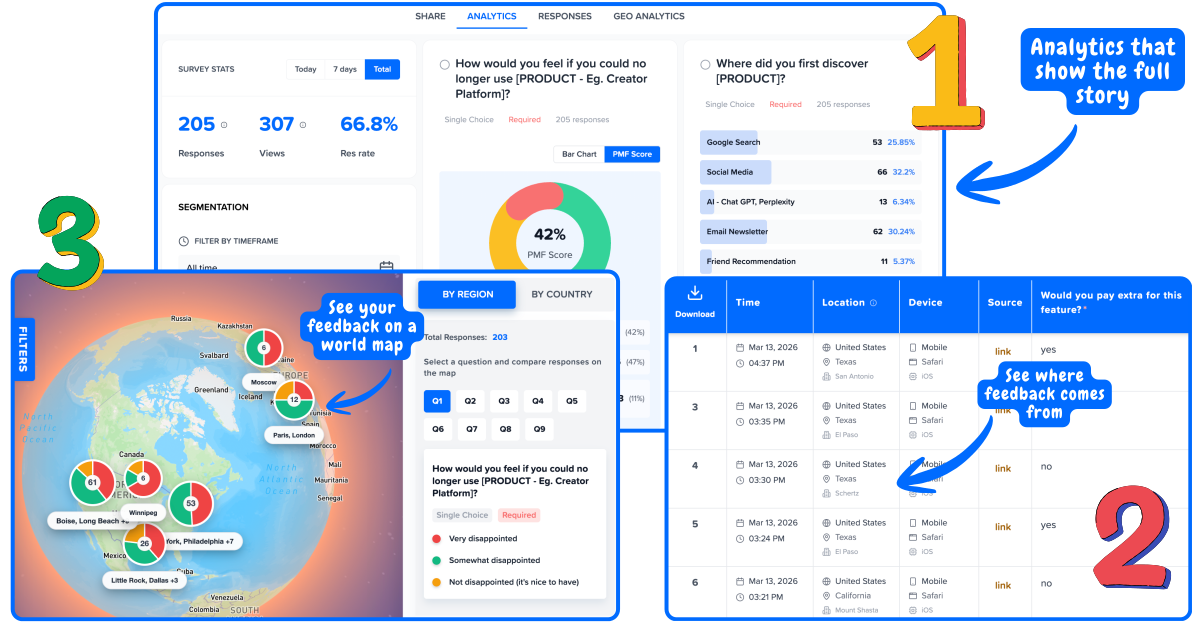
Filter any survey by user segment. An NPS of 42 overall may hide a score of 8 among users who joined in the last 30 days - the cohort most likely to churn. Segment first, then act.
User feedback analytics by plan tier, geography, cohort, and custom attributes.
04
Close the loop
Identify the top complaint from your last 90 days of user feedback. Fix it. Tell users you fixed it. This is the user feedback process that compounds over time - each loop raises the next NPS.
Detractor recovery, promoter activation, feature announcement messaging.
User feedback collection methods
Not all user feedback channels are equal. In-product collection outperforms every alternative on response rate and data quality.
In-product surveys
Highest signalSurveys triggered inside your product based on user behavior - onboarding completion, feature use, scroll depth, exit intent, session count. Every response tied to a real user account. Response rates average 20-40%.
Best for: NPS, CSAT, CES, PMF, feature feedback
In-product surveys →In-app surveys (mobile)
High signalUser feedback collection inside native mobile apps. Triggered by behavioral events - app session count, feature completion, purchase, or upgrade. Captures mobile user experience feedback that email surveys miss.
Best for: Mobile CSAT, app store pre-prompts, mobile NPS
In-app surveys →Website user surveys
Good signalCollect user feedback on your website - exit-intent popups, page-specific widgets, scroll-triggered surveys on docs or pricing. Captures feedback from visitors before they convert, and from users returning to the website.
Best for: Exit intent, docs feedback, pricing page friction
Website surveys →Email surveys
Lower signalUser feedback surveys sent via email - best for post-support CSAT, milestone-based NPS, or reaching churned users. Response rates 10-20%. Use when in-product delivery is not possible, not as a first choice.
Best for: Post-support CSAT, milestone NPS, churn surveys
Email surveys →User satisfaction survey types
Each survey type answers a different question about the user experience. Run them at different points in the user journey.
User satisfaction survey (CSAT)
"How satisfied were you with [experience]?" (1–5)
When: After onboarding, after support, after feature launch
Measures satisfaction with a specific interaction. Low CSAT on onboarding predicts 30-day churn. Low CSAT on support predicts churn 4-6 weeks out.
See User satisfaction survey tool →User loyalty survey (NPS)
"How likely are you to recommend us?" (0–10)
When: Quarterly or 30 days after activation
Captures overall user loyalty, not just single-interaction satisfaction. Segment by plan and cohort - an NPS of 40 overall can hide a score of 8 among your highest-value segment.
See User loyalty survey tool →User effort survey (CES)
"How easy was it to [complete task]?" (1–7)
When: After setup, checkout, or any high-effort interaction
CES predicts churn better than satisfaction. Users who had to work hard to achieve something are 4x more likely to leave - even if they eventually succeeded.
See User effort survey tool →End user PMF survey
"How would you feel if you could no longer use this?" (Very / Somewhat / Not disappointed)
When: After 30+ days of active use, for early-stage teams
The Sean Ellis test for product-market fit. 40%+ "very disappointed" is the benchmark. Segment to find your champion users - they tell you what to build for.
See End user PMF survey tool →User experience feedback and website user feedback
UX feedback is most valuable when captured at the moment of friction - not reconstructed from memory in a follow-up email.
Get user feedback on your website
Exit-intent surveys, scroll-triggered feedback forms, and page-specific widgets let you collect user feedback on website pages without requiring users to be logged in. Ask one question: "Did you find what you were looking for?" - then route responses to the right team.
User experience feedback surveys
UX feedback surveys capture friction at the feature or task level: "How easy was it to set up your first survey?" A 1-2 question user experience feedback survey placed immediately after a task outperforms a 10-question UX research survey sent three days later.
App user experience surveys
Collect user experience feedback inside your web or mobile app after specific interactions. App user experience surveys triggered after first feature use or onboarding completion give you the earliest signal of whether users will activate - before retention data catches up.
After you collect
User feedback analytics
Raw scores are noise. Segmented user feedback analytics are signal.
Mapster links every response to the user who gave it - so you can filter any survey by plan tier, role, signup cohort, geography, or any custom attribute. When 40 enterprise users rate onboarding a 2/5 in the same week, your product team has a specific problem to fix, not an average to monitor.
User feedback analytics should tell you who is unhappy, where in the journey they hit friction, and what they said about it.
Segment by plan tier
Free vs Pro vs Enterprise users rarely have the same experience. Segment first - then compare. An NPS of 55 overall may hide a score of 15 among the segment that drives 80% of revenue.
Segment by signup cohort
Users who joined after your last product update have a different experience than users who joined before. Cohort segmentation shows you whether your improvements are actually landing for new users.
Segment by user role
In B2B products, admins and end users have different jobs to be done. Admin NPS of 70 can coexist with end-user CSAT of 3/5 - segment to see what each group actually needs.
Track user feedback trends
Direction matters more than the current score. A CSAT that drops from 4.2 to 3.8 over 6 weeks across your onboarding cohort is an early warning - not a crisis yet, but a clear signal to investigate.
Frequently asked questions
What is user feedback software?+
User feedback software is a tool that collects, organizes, and analyzes feedback from individual end users - not just aggregate survey results. The key differentiator from generic survey tools is that every response is tied to a real user account, letting you segment by plan, cohort, role, or behavior. This means you can see that enterprise users rate your onboarding a 3/5 while free users rate it 4.5/5 - and follow up with the right segment, not an average.
How do you collect user feedback?+
Four main user feedback collection methods: (1) In-product surveys - triggered inside your app based on user behavior. Highest response rates: 20-40%. (2) Website feedback widgets - collect feedback on specific pages without requiring a login. (3) Email surveys - sent after key milestones. Response rates: 10-20%. (4) User interviews - qualitative sessions to understand the why behind survey scores.
What is the difference between user feedback and customer feedback?+
User feedback focuses on the individual end user's experience - how easy a feature is to use, their satisfaction with a specific interaction. Customer feedback is measured at the account or relationship level - overall NPS, renewal likelihood, account health. In SaaS, both matter: good individual user feedback aggregates into positive customer-level health.
What is user experience feedback?+
User experience (UX) feedback captures how users feel about the usability, design, and overall experience of your product or website. Common UX feedback methods: CSAT surveys after specific interactions, CES surveys measuring effort, and open-text questions asking what users would change. UX feedback is most actionable when triggered immediately after a specific interaction - not days later via email.
How do you get user feedback on a website?+
Four ways: (1) Exit-intent surveys - show 1-2 questions when users move to leave. (2) Page-specific feedback widgets - thumbs-up/down on docs, pricing, or feature pages. (3) Scroll-triggered surveys - appear after users read 60-80% of a page. (4) Post-conversion surveys - shown after signup or purchase. Keep website surveys to 1-2 questions for maximum completion.
What is an end user satisfaction survey?+
An end user satisfaction survey measures how satisfied individual users are with your product - typically using CSAT (1-5), NPS (0-10), or CES (1-7). In B2B SaaS, this matters because the account decision-maker and the end users are often different people: you can win the renewal with an executive while losing advocates among the team that actually uses the tool.
How do you manage user feedback?+
User feedback management has four stages: (1) Collect - run in-product, website, and email surveys at behavioral trigger points. (2) Route - send detractor alerts to CS, low CES scores to product, feature requests to your roadmap tool. (3) Analyze - segment by plan, role, and cohort to find patterns. (4) Close the loop - tell users what changed because of their feedback. This converts users into advocates.