

Feedback Survey Software
The Feedback Tool for SaaS, Startups and Ecommerce
A survey maker for feedback and satisfaction surveys. Know exactly why customers buy, and why they don't.
No credit card required
Selling online? See ecommerce surveys
"Honestly just grab this deal. The founder is responsive and the product
looks great and is actually fun to use."- magicmike, verified AppSumo subscriber
You can also collect feedback by sending users a link like this one
Ask at the right moment
In-product Surveys, fired at the
Crucial Moments, with Context and Identity
A customer just tried your new export button. Right now she knows exactly what worked and what felt clumsy, so ask in the moment and the answer comes with context. A survey four days later just measures memory
Onboarding just finished
First impressions are fresh. Ask for CES before habits set in.
30 days of active use
Enough context for a real signal. Run the Sean Ellis PMF question.
Support ticket resolved
Measure effort (CES) while the interaction is fresh.
Power user, high usage
Spot expansion-ready accounts and open the upsell conversation.
About to cancel
Capture the real churn reason at the exact moment they leave.
Don't see your use case?
Create your own surveys and triggers based on specific user actions, events, or attributes. If you can track it, you can ask about it, right when it matters.
Build your first surveyFree plan, no credit card
Analyze
Analyze Feedback by Who
not Just What They Said
Understand the WHO, WHAT and WHY behind your feedback

Segment
Every Response comes with
the User and Context behind it
From "scores look fine" to "here's exactly what to fix"
Generic feedback tools
"100 users are happy, 40 are unhappy."
Mapster - user-linked feedback
100 happy users · pro plan users · from USA · "love onboarding"
40 unhappy users · free plan users · from United Kingdom · "frustrated by pricing"
Now you know exactly which users need help, and why.
Build
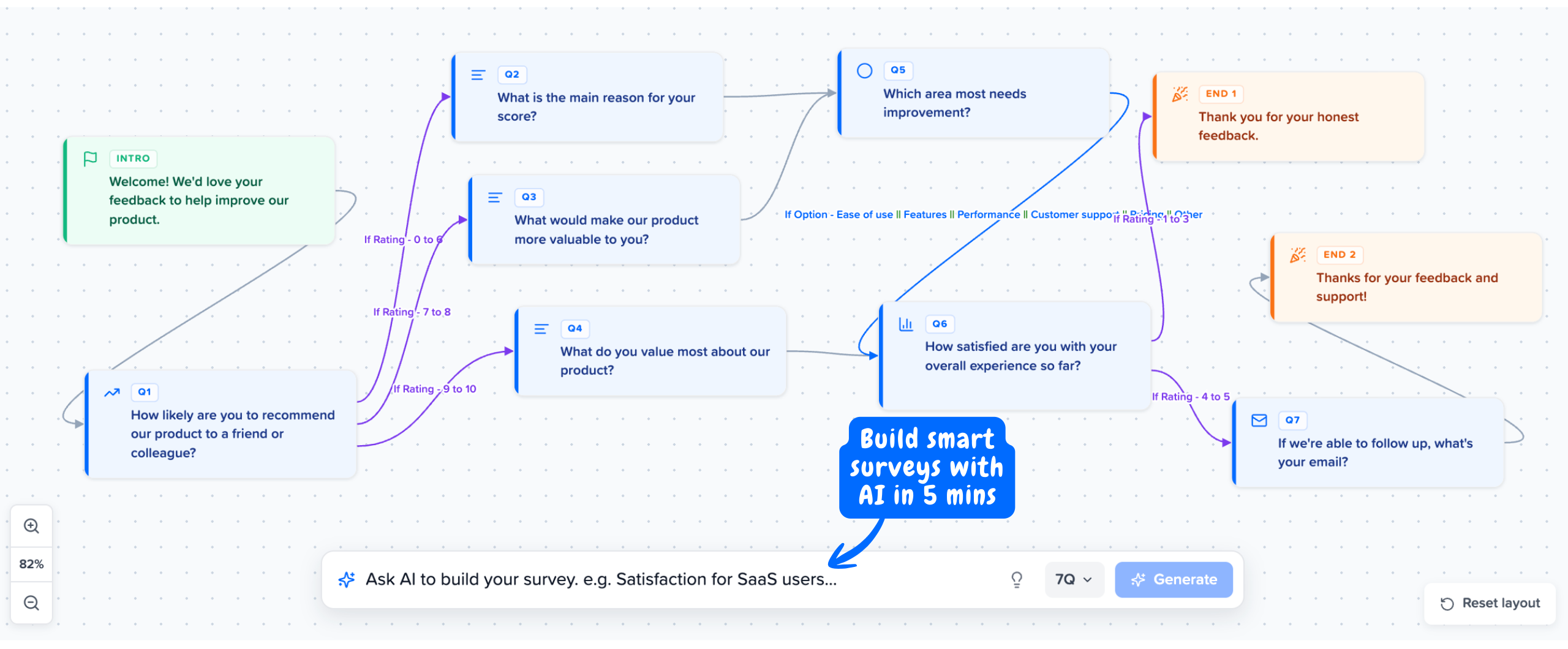
Build smart Surveys with
Conditional Logic
Send power users to a feature-request ask. Route detractors to a deeper "what went wrong?" Higher completion rates, cleaner feedback, no dead ends.
Use Cases
What you can do with
User-linked Feedback
Mapster is built to understand users, improve retention, and grow revenue.
Track NPS by segment
Run NPS surveys in-product and break the score down by plan, role, or region instead of one blended number.
Measure CSAT at key moments
Run CSAT after onboarding, a launch, or a support touch, and compare how each segment scores.
Run microsurveys in-product
One or two question microsurveys triggered at the right moment, so you get answers without interrupting the flow.
Collect customer feedback & Track customer satisfaction over time
Gather feedback from your real users across the journey, with every response linked to who they are.
Decide what to build next
Collect product feedback tied to who asked, so you build by segment and value, not by who is loudest.
Measure Product Market Fit
Run the Sean Ellis PMF survey and see which segment would be 'very disappointed' without you.
Surveys Triggered Exactly When and Where You Want in Your Product
Every response linked to a real user, so you build for the segment that drives your business, not the one that shouts the loudest. Run NPS, CSAT, and product feedback right inside your product.
Start Collecting FeedbackFree plan available · No credit card required