

NPS · CSAT · CES · PMF
Customer Feedback Survey Software
Segmented by User, Feature & Plan
Run NPS, CSAT, CES, and PMF surveys inside your product or via email. Every response tied to the real user who gave it - so you can see which segments are happy, which are at risk, and exactly why.
No credit card required
The four customer feedback survey types
Each survey type answers a different question. Use them together for a complete picture of customer health.
NPS - Net Promoter Score
"How likely are you to recommend us to a friend or colleague?" (0–10)
Measures: Long-term loyalty and word-of-mouth potential across your entire customer base.
When to send: Every 90 days as a relationship survey, or 30 days after onboarding and 60 days before renewal.
How to segment: Segment by plan tier. An NPS of 42 overall can hide a score of 12 among enterprise users who represent 80% of revenue.
CSAT - Customer Satisfaction Score
"How satisfied were you with [experience]?" (1–5)
Measures: Satisfaction with a specific interaction -support ticket, feature launch, or onboarding step.
When to send: Immediately after a support resolution, after first use of a new feature, or after onboarding completion.
How to segment: Segment by support agent, feature, or user cohort to find exactly where friction exists, not just that it exists.
CES - Customer Effort Score
"How easy was it to [complete task]?" (1–7)
Measures: Friction in your product experience or support process. High effort = high churn risk.
When to send: Right after a task completion -checkout, setup wizard, support ticket, or upgrade flow.
How to segment: Segment by user role or plan to see if new users find something hard that power users find easy.
PMF - Product-Market Fit
"How would you feel if you could no longer use this product?" (Very disappointed / Somewhat / Not disappointed)
Measures: Whether you have product-market fit. 40%+ "very disappointed" is the benchmark (Sean Ellis test).
When to send: Once you have 40+ active users. Repeat after major product changes or pivots.
How to segment: Segment to find your champion users -the "very disappointed" group. Build for them.
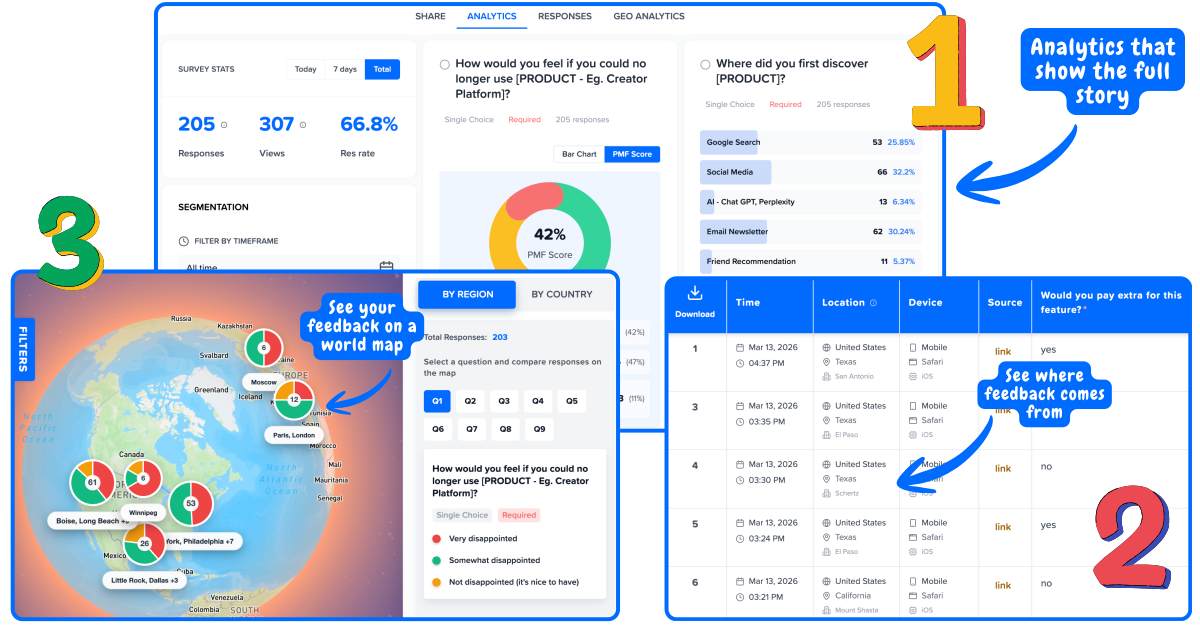
When to send customer feedback surveys
Timing determines response rate and data quality. Surveys sent at the wrong moment - or too often - cause survey fatigue and produce inaccurate data.
Day 1 -Onboarding
CES after setup wizard
Catch friction before users churn silently. If setup is hard, most users never come back.
Day 7–14 -First value moment
CSAT after first key action
Did they get value from the core feature? This is your best predictor of 30-day retention.
Day 30 -Post-onboarding
NPS relationship survey
First honest read of overall satisfaction. Compare by signup cohort and plan type.
When you have 40+ active users
PMF survey
Are you building something people would genuinely miss? The 40% threshold tells you if you have traction.
After every support ticket
CSAT immediately post-resolution
Support CSAT is the single best leading indicator of churn. Low scores need same-day follow-up.
Every 90 days
NPS relationship survey
Track loyalty trends over time. Changes in NPS by segment predict churn 60–90 days in advance.
On cancellation
Exit survey (open-ended + reason)
The most honest feedback you will ever get. Use it to fix the top 3 churn reasons.
Why averages are the wrong metric
An overall NPS of 42 looks healthy. But segmented by customer type, it tells a completely different story.
Without segmentation
NPS: 42
1,000 responses · Average score
“Looks healthy. Let's keep going.”
With Mapster segmentation
Free plan users
NPS 78
5% of revenue
"Love it -more templates please"
Pro plan users
NPS 55
15% of revenue
"Missing integrations we need"
Enterprise users
NPS 12
80% of revenue
"Support is too slow for what we pay"
Now you know exactly what to fix and for whom.
How to set up customer feedback surveys with Mapster
Three steps. No code after the initial install.
Install the widget
Add one JavaScript snippet to your site or app -the same way you add Google Analytics. Takes 2 minutes. Works on any stack.
Pass a user ID to link every response to a real user automatically.
Choose your survey type
Pick from NPS, CSAT, CES, PMF, exit survey, or custom templates. Set your trigger -time on page, scroll depth, exit intent, or post-action.
Customize colors and logo to match your brand. Surveys look like they belong in your product.
Read the segmented results
Every response appears in your dashboard linked to the user who submitted it. Filter by plan, role, location, or any attribute you pass.
No spreadsheets. No manual tagging. Segments are built automatically.
Want the complete guide to collecting and acting on customer feedback? See customer feedback guide →
Frequently asked questions
What are customer feedback surveys?+
Customer feedback surveys are structured questionnaires that collect opinions, satisfaction scores, and insights from your customers. They typically measure loyalty (NPS), satisfaction (CSAT), effort (CES), or product-market fit. The goal is to understand what customers think so you can improve your product, reduce churn, and build what people actually want.
What types of customer feedback surveys are there?+
The main types are: NPS (Net Promoter Score) -measures loyalty with "How likely are you to recommend us?" on a 0-10 scale. CSAT (Customer Satisfaction Score) -measures satisfaction with a specific interaction on a 1-5 scale. CES (Customer Effort Score) -measures how easy an experience was. PMF (Product-Market Fit) -measures how essential your product is with "How would you feel if you could no longer use this product?"
How often should I run customer feedback surveys?+
NPS: quarterly for relationship surveys, or triggered after key milestones (first 30 days, renewal). CSAT: immediately after support interactions or feature usage. CES: right after a specific task. PMF: once you have 40+ active users. Don't survey the same users more than once per quarter with the same survey.
How do I segment customer feedback?+
Mapster links every survey response to a real user and their attributes -plan type, role, signup date, company size. This means you can filter NPS results to see that enterprise users score you 12 while free users score 78, so you know exactly which segment needs attention instead of chasing an average.
What is the best customer feedback survey question?+
For loyalty: "How likely are you to recommend us?" (NPS). For churn prevention: "How would you feel if you could no longer use this product?" (PMF). For feature feedback: "How easy was [feature] to use?" (CSAT). Start with one question -only add more when the first gives you actionable data.
Are customer feedback surveys free with Mapster?+
Yes. The free plan includes NPS, CSAT, CES, and PMF surveys, unlimited responses, user identity linking, geo analytics, and basic segmentation. No credit card required.