

The Honest Guide
Google Forms Conditional Logic: What Works and What Does Not
Google Forms has section-based conditional skip logic. It does not have real branching logic. Here is exactly what the feature can do, what it cannot, and where teams hit the wall.
What Google Forms conditional logic actually does
One feature, called Go to section based on answer. Here is how it works.
How to enable it
- 1. Add a question of type Multiple choice or Dropdown.
- 2. Click the three-dot menu on the question.
- 3. Select Go to section based on answer.
- 4. For each answer option, pick a destination: another section, the next section, or Submit form to end the survey.
What works
- Route users to different sections based on a multiple choice answer.
- Skip sections entirely for users whose answer makes them irrelevant.
- End the survey early for certain answers (Submit form).
- Build a simple two-path flow (e.g. "Are you a customer? Yes / No" then route).
What Google Forms conditional logic cannot do
Six limits that show up the moment your survey needs real branching.
Conditional logic on a linear scale (the NPS / CSAT problem)
You cannot route differently based on a rating. Detractors (0 to 6) get the same follow-up as promoters (9 to 10), because linear scale questions do not support Go to section. This is the single biggest reason teams running NPS or CSAT outgrow Google Forms.
Logic on checkbox, text, date, or file questions
The Go to section feature only works on multiple choice and dropdown. Checkbox (multi-select), short answer, paragraph, date, time, and file upload questions cannot trigger conditional logic at all.
Show or hide individual questions
Google Forms only branches at the section level. You cannot hide a single question conditionally. If you want one follow-up to appear only for a specific answer, you must wrap it in its own section and route to that section.
Multi-condition rules
You cannot combine conditions. There is no way to say "If plan equals Pro AND score is below 5, show this question". Each question's logic depends on its own answer only, with no reference to prior answers.
Numeric comparison (less than, greater than)
Even on linear scale or short text questions where a number is the answer, you cannot use numeric comparison. There is no "if value is less than 5" condition. Only exact-match on multiple choice and dropdown.
Loops, repeats, or per-path follow-ups with merging
You cannot repeat a section. You cannot run two parallel paths that merge back into a common section with consolidated data. Google Forms section logic is linear and one-shot.
Honest detour
When section-based logic is enough
Google Forms section logic is not weak. It is narrow. For some surveys, narrow is fine.
Stick with Google Forms section logic when:
- Your branching is one or two paths based on a simple multiple choice answer.
- You never need to branch on a rating, a number, or free text.
- Your survey is one-time (event registration, RSVP, role-based intake).
- You will read every response by hand and segmentation does not matter.
If your survey is doing more than this, here is what real branching logic looks like.
Real Branching Logic in Mapster, Built in 2 Minutes with AI
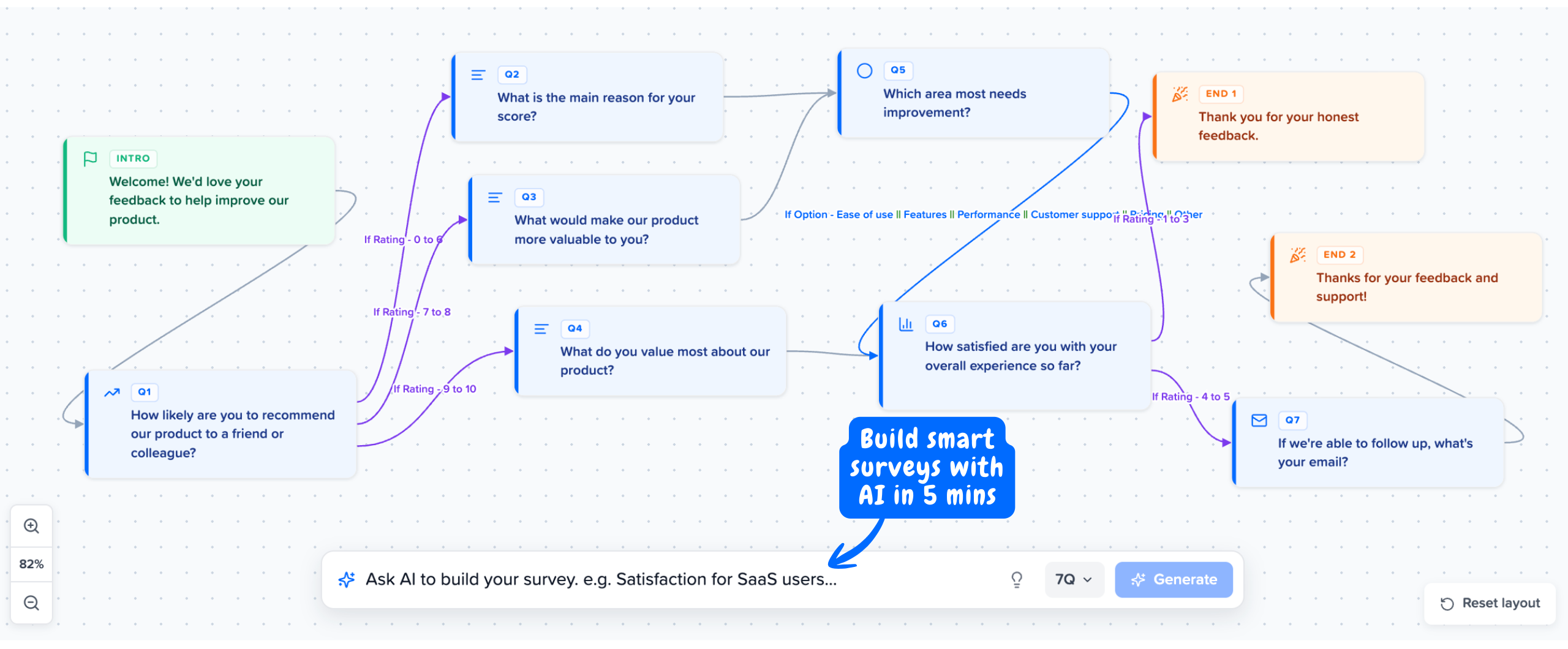
Route on any question type, any answer, any condition. Detractors get one path, promoters get another. Pro users see different follow-ups than free users. Built visually or generated from a prompt.
No credit card required
What real branching logic adds
The same six gaps from above, addressed.
Mapster does
Branch on a linear scale
Detractors (0 to 6) see "What is the main reason for your low score?". Promoters (9 to 10) see "Would you leave us a review?". Passives skip the follow-up entirely.
Mapster does
Branch on checkbox, text, or any question type
Every question type supports conditional logic. A user who picks 3 specific features in a checkbox can be routed to a feature-specific follow-up.
Mapster does
Show or hide individual questions
Per-question visibility. Hide a single question conditionally without restructuring the survey into sections.
Mapster does
Multi-condition rules
Combine conditions with AND / OR. Show an enterprise-specific question only when plan equals Enterprise AND score is below 7.
Mapster does
Numeric comparison
Use less than, greater than, between, and equals on any numeric answer. Route differently for NPS scores 0 to 3, 4 to 6, 7 to 8, and 9 to 10.
Mapster does
AI-generated logic
Describe the flow in natural language. Mapster generates the survey, the questions, the scales, and the branching paths automatically.
Google Forms vs Mapster: conditional logic
Capability by capability.
| Capability | Google Forms | Mapster |
|---|---|---|
| Conditional logic on multiple choice | Yes (section-based) | Yes (per-question) |
| Conditional logic on linear scale (NPS, CSAT) | No | Yes, with numeric ranges |
| Conditional logic on checkbox / text | No | Yes |
| Show / hide individual questions | No (section-level only) | Yes |
| Multi-condition rules (AND / OR) | No | Yes |
| Numeric comparison (less than, greater than) | No | Yes |
| Branch on a previous answer | No | Yes |
| End survey early on specific answers | Yes (Submit form) | Yes (with custom end-state messages) |
| AI-generated logic flow | No | Yes |
| Visual logic editor | No (manual section routing) | Yes |
Looking at the full picture? Mapster vs Google Forms covers every capability, not just logic.
Build a survey with conditional logic in 2 minutes
Per-question branching on ratings, checkboxes, text, and multi-condition rules. AI generates the whole flow from a prompt. Free plan available, Pro from $8 a month.
Try Mapster FreeNo credit card required