

Product Satisfaction Surveys for SaaS Teams
Know If Users Are Happy With What You Built with Product Satisfaction Survey
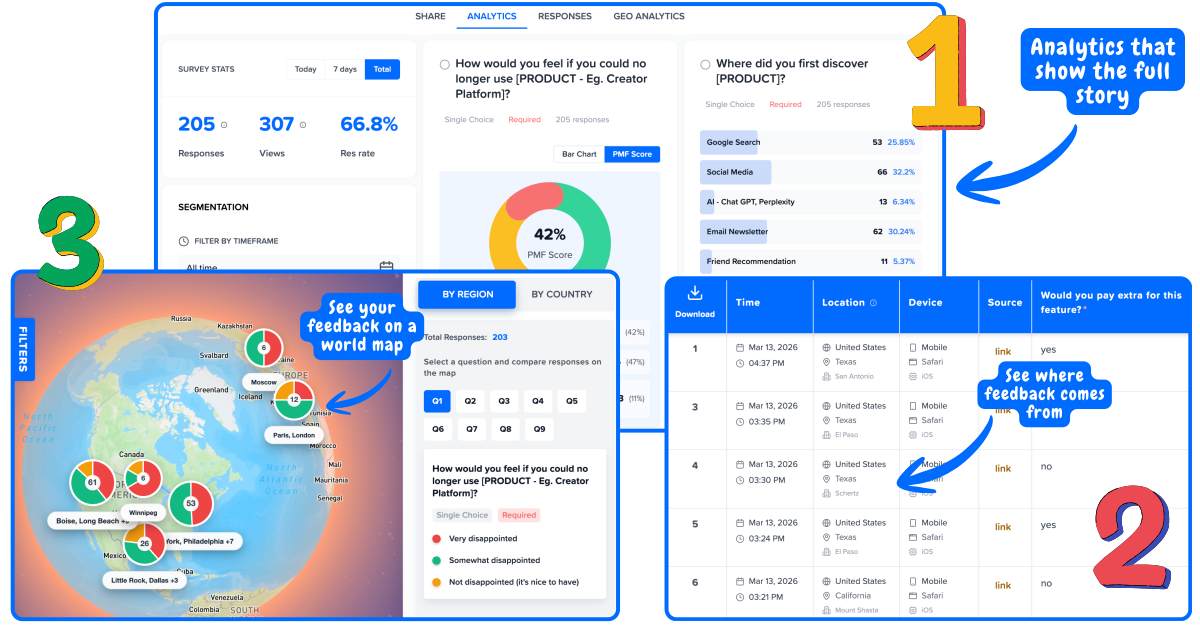
Link every product satisfaction response to the user who sent it.
Customer satisfaction surveys tell you if your support was good. Product satisfaction surveys tell you if your product is good. Run feature satisfaction, post-release, and PMF surveys in-product, segment by usage level and plan tier, and find out what to build next.
No credit card required
Product satisfaction vs customer satisfaction: a different question
They sound similar. They tell you completely different things. Running only one of them leaves a gap in what you can act on.
Customer Satisfaction
Measures
How well your service met expectations
Key surveys
CSAT after support, NPS at renewal, CES after onboarding
Core question
"Was this interaction good?"
Leads to
Service improvements, support process fixes
Product Satisfaction
Measures
How well your product meets user needs
Key surveys
Feature CSAT, post-release validation, PMF, product NPS
Core question
"Does this product do what I need it to?"
Leads to
Roadmap decisions, feature improvements, build vs kill calls
This page
The gap most teams miss: A team can have excellent customer satisfaction scores (fast support, smooth onboarding) while still losing users because the product does not solve the right problem. Product satisfaction surveys close that gap. They are the signal between "did we serve them well?" and "did we build the right thing?"
The 4 product satisfaction surveys every SaaS team should run
Each measures a different dimension of product satisfaction. Together, they tell you what to build, what to fix, and what to kill.
Feature Satisfaction (CSAT)
When: After a user activates or uses a feature for the first time
Measures: Whether the feature does what users expected. The earliest signal on whether what you built actually works.
If low: Low feature CSAT means the feature is confusing, buggy, or does not match the job users hired it for.
Post-Release Validation
When: 7 to 14 days after a major update ships
Measures: Whether the release solved the problem you built it for. Most teams ship and move on. This closes the loop.
If low: If the post-release score is the same as before the update, the release did not address the root problem.
PMF Survey (Sean Ellis)
When: At 40+ active users with 30+ days of usage, then quarterly
Measures: Whether users need your product, not just like it. 40%+ "very disappointed" = product-market fit.
If low: Segment by user type. A 32% overall PMF can hide 67% among your core segment. The segment number is what matters.
Product NPS
When: Quarterly, separate from any support or service NPS
Measures: Overall product loyalty. Run this separately from relationship NPS so service quality does not contaminate the product signal.
If low: Product NPS 10+ points below relationship NPS is a red flag: users like how you treat them but have doubts about the product itself.
Product satisfaction scores mean nothing without segmentation
A feature satisfaction score of 68% can mean your product has a problem or your onboarding has a problem. Segmentation tells you which.
Without segmentation
Feature Satisfaction
68%
89 responses
Something is wrong, but you do not know if it is the feature, the onboarding, or the user segment.
With Mapster segmentation
The feature works. New users do not understand it yet. Fix the onboarding, not the feature.
The same logic applies to PMF
A 32% overall PMF score looks like you have not found fit yet. Segmented by user type: small agencies score 67% "very disappointed," enterprise scores 18%. You have strong PMF with small agencies and no fit with enterprise. That is not a failure, it is a direction. Now you know exactly who to build for.
Full PMF survey guide →When to send each product satisfaction survey
Product satisfaction surveys should be triggered by product events, not by a calendar. The closer the survey is to the moment, the more accurate the signal.
Feature first used (day 3 to 7)
Feature CSATWhat to do: Send a 1 to 2 question CSAT survey 3 to 7 days after a user first activates a specific feature.
What it tells you: Early feature satisfaction is the most actionable signal you can collect. It tells you if the feature lands before you waste more engineering time on it.
Segment by: Usage frequency: users who hit the feature daily vs once have very different satisfaction levels and need different follow-ups.
7 to 14 days after a release ships
Post-releaseWhat to do: Send a short survey to users who were affected by the update, asking if it solved the problem they had.
What it tells you: Most teams ship and move on without closing the loop. Post-release surveys tell you if the release actually worked, not just if it shipped.
Segment by: Affected vs unaffected users: compare scores from users who experienced the old version vs those who only know the new one.
Day 30 of active use
PMFWhat to do: Send the first PMF survey at 30 days: "How would you feel if you could no longer use this product?"
What it tells you: Day 30 is the earliest reliable PMF read. Before 30 days, users have not experienced enough value to give an honest answer.
Segment by: Acquisition channel and user role: PMF varies significantly by how users found you and what job they hired the product for.
Quarterly
PMF + Product NPSWhat to do: Repeat the PMF survey and a product-specific NPS every quarter for all active users.
What it tells you: Quarterly tracking shows whether product satisfaction is improving as you ship. A PMF score that does not move after three quarters of shipping is a product-direction problem.
Segment by: Plan tier and cohort: track whether new cohorts are reaching PMF faster than earlier cohorts did.
Usage drops (14+ days inactive)
Open surveyWhat to do: Trigger a short open survey when an active user goes quiet: "What happened? What was missing?"
What it tells you: Silent disengagement is the hardest churn to diagnose. This is the last window to collect signal before they are gone.
Segment by: Previous satisfaction score: users who scored high and then went quiet have a different problem than users who always scored low.
What is a good product satisfaction score?
Benchmarks for each survey type. Use these to gauge where you stand, then segment to find out what is driving the score.
Product satisfaction survey questions that work
The right question depends on which dimension of product satisfaction you are measuring. Use these as starting points.
"How satisfied are you with [Feature Name]?"
Send 3 to 7 days after first activation. Answered on a 1 to 5 scale. The most direct product signal you can collect.
"Does [Feature Name] do what you expected it to do?"
Yes / Partially / No. Useful when satisfaction is low and you need to know if it is an expectation mismatch or an execution problem.
"How often do you use [Feature Name]?"
Frequency question paired with CSAT. Low satisfaction plus high frequency is a very different problem than low satisfaction plus low frequency.
"What would make [Feature Name] better for your workflow?"
Open text follow-up for users who rated 3 or below. Read every answer. These are your next sprint backlog.
"How would you feel if you could no longer use [Product]?"
Very disappointed / Somewhat disappointed / Not disappointed. The Sean Ellis PMF question. 40%+ "very disappointed" = product-market fit. Segment before interpreting.
"What is the main benefit you get from [Product]?"
Open text. Your positioning is not what you say it is. It is what users say in response to this question. Collect these answers and read them as a group.
"What type of person do you think would benefit most from this?"
Your users describe your ideal customer profile better than any internal exercise. The words they use become your best marketing copy.
"How can we improve [Product] for you?"
Phrase it as improvement, not as a feature request. "What features do you want?" gets a wish list. "How can we improve?" gets pain points.
"Did the recent update to [Feature] solve the problem you were having?"
Yes / Partially / No. Close the loop on your own release. Most teams never ask this question.
"How satisfied are you with the changes made to [Feature] in the last update?"
CSAT scale on the release itself. Compare to the pre-release score. If it did not move, the release missed the root cause.
"What is still missing after this update?"
Open text. The answers tell you what to put in the next release. Run this for every major update.
How to read product satisfaction survey results
Product satisfaction scores rarely mean what they appear to mean at the aggregate level. Segment first, diagnose second.
Feature CSAT is low overall
Segment by user tenure before changing anything. Low CSAT among new users means an onboarding or discoverability problem. Low CSAT among power users means the feature itself needs work. These require completely different fixes.
PMF is below 40% overall
Segment by every attribute you have before concluding you lack product-market fit. A 32% overall score often hides a 60%+ score among a specific segment. Find that segment and narrow your ICP to them.
Post-release CSAT did not improve
The release addressed a symptom, not the root problem. Go back to the pre-release feedback and look for the question your users were actually asking. What they asked for and what they needed are often different things.
High PMF but churn is rising
Your PMF survey is not segmented. The churning users are a specific cohort (often newer users or a specific plan tier) whose scores are not yet reflected in your historical PMF average. Segment by signup cohort immediately.
Product NPS is much lower than relationship NPS
Users like how you treat them but have growing doubts about the product itself. They stay because the switching cost is high or support is good, not because the product solves their problem. A product direction problem, not a service problem.
Feature CSAT is high but usage is dropping
Users like the feature when they use it but are not returning to it. The satisfaction signal is not the issue. The discoverability, workflow fit, or trigger to use the feature is the problem. Focus on activation, not feature quality.
Product satisfaction is part of a broader feedback picture. For service-level satisfaction covering support and onboarding, see the customer satisfaction surveys guide.
Frequently asked questions
What is a product satisfaction survey?+
A product satisfaction survey measures whether users are happy with the product itself, not with a service interaction. The main types are feature satisfaction CSAT (triggered after a user activates a feature), post-release validation surveys (sent after a major update), PMF surveys (measuring whether users need your product), and product NPS (overall product loyalty). Together they tell you what to build, what to fix, and what to kill.
How is a product satisfaction survey different from a customer satisfaction survey?+
Customer satisfaction surveys measure service quality at specific touchpoints: was support good, was onboarding smooth, was the renewal process easy. Product satisfaction surveys measure whether the product itself meets user needs: does this feature work, did this release solve the problem, do users need this product. Both matter, but they answer different questions and lead to different actions. Running only service satisfaction surveys is a common gap in product feedback programs.
When should I send product satisfaction surveys?+
Trigger each survey on the product event it measures: feature CSAT 3 to 7 days after first activation, post-release surveys 7 to 14 days after a major update, the first PMF survey at day 30 of active use, and product NPS quarterly. For inactive users (14+ days silent), send a short open survey immediately. Do not send these on a fixed schedule. A product satisfaction survey sent days after the relevant event gets a vague, reconstructed answer.
What is a good product satisfaction score?+
For feature satisfaction CSAT, above 82% is excellent, 70 to 82% is good, below 55% needs immediate attention. For PMF, 40%+ "very disappointed" is the threshold for product-market fit. For product NPS, above 30 is good for SaaS, above 50 is excellent. More important than the absolute number is segmenting by user type before interpreting any of these scores, as they vary significantly across usage levels and plan tiers.
How do I measure product satisfaction without annoying users?+
Three rules: keep each survey to one or two questions, trigger on the relevant product event (not a timer), and suppress any user who responded in the last 30 to 90 days. In-product surveys embedded at the right moment get 20 to 40% response rates and feel natural. Email surveys sent days after the moment feel intrusive and get 5 to 15% response rates. Timing matters more than frequency.
How do I use product satisfaction survey results to improve my product?+
Segment first, route second, act third. Segment every score by plan tier, usage level, and tenure before drawing conclusions. An average feature CSAT of 68% can mean very different things for new users vs power users. Once you know which segment is dissatisfied, route that signal to the person building the feature, fix the specific problem, and close the loop with the users who flagged it. Mapster links every response to the user who submitted it so you can segment without exporting to a spreadsheet.
Can I run feature satisfaction, PMF, and post-release surveys in one tool?+
Yes. Mapster supports feature CSAT, PMF, post-release surveys, product NPS, and CES in one platform. Every response is linked to the user who submitted it, so you can segment all survey types by the same user attributes (plan tier, role, usage frequency, tenure) and compare product satisfaction across your full user base without switching tools.